Overview

This section highlights the core features, use cases, and supporting notes.

Connected Papers is a visual literature exploration tool for researchers, graduate students, and review-heavy knowledge workers who want to map a paper landscape instead of scanning search results one by one. It is strongest when you already have one good seed paper and need a research paper graph to discover related work, trace prior works, inspect derivative works, and build a stronger reading path or bibliography. Its biggest strengths are visual clustering, similarity-based discovery, and practical graph-to-list workflow, but it is not a full citation manager, not a plain-language reading assistant, and not a substitute for actually reading the papers it surfaces.

Connected Papers is most useful when your real problem is orientation, not access. Many researchers and students can already search for papers, but they still struggle to understand how a field is shaped, which papers cluster together, and where to start reading beyond a few obvious results. The official homepage frames the product as a visual graph, and that framing is exactly right. This is not mainly an academic search box. It is a paper discovery graph for researchers who want to see a field’s structure faster and build a more deliberate reading path from one good seed paper.


Annotated screenshot of the official Connected Papers homepage showing the visual graph entry and seed-paper search workflow
This homepage screenshot matters because it shows the product’s real starting point: you begin with one paper identifier and build outward from there, rather than browsing an endless general search list. Click the image to open the full-size screenshot.

The methodological explanation on the official About page is one of the reasons the tool earns trust. Connected Papers explicitly says it is not a citation tree. Instead, it builds similarity relationships using ideas like co-citation and bibliographic coupling, then arranges papers in a force-directed graph. That distinction matters a lot. Users searching for a visual literature exploration tool can easily assume every line means direct citation, but that is not what this graph is for. Its value is that it can pull related papers close together even when they do not cite each other directly. In practice, that makes it more useful for topic mapping than a simple lineage chart.


Annotated screenshot of the official Connected Papers about page highlighting that the graph is not a citation tree and is based on co-citation and bibliographic coupling
The methodology screenshot deserves a place in the article because it explains the most important interpretation rule: this graph is about similarity structure, not a literal citation family tree. Click the image to open the full-size screenshot.

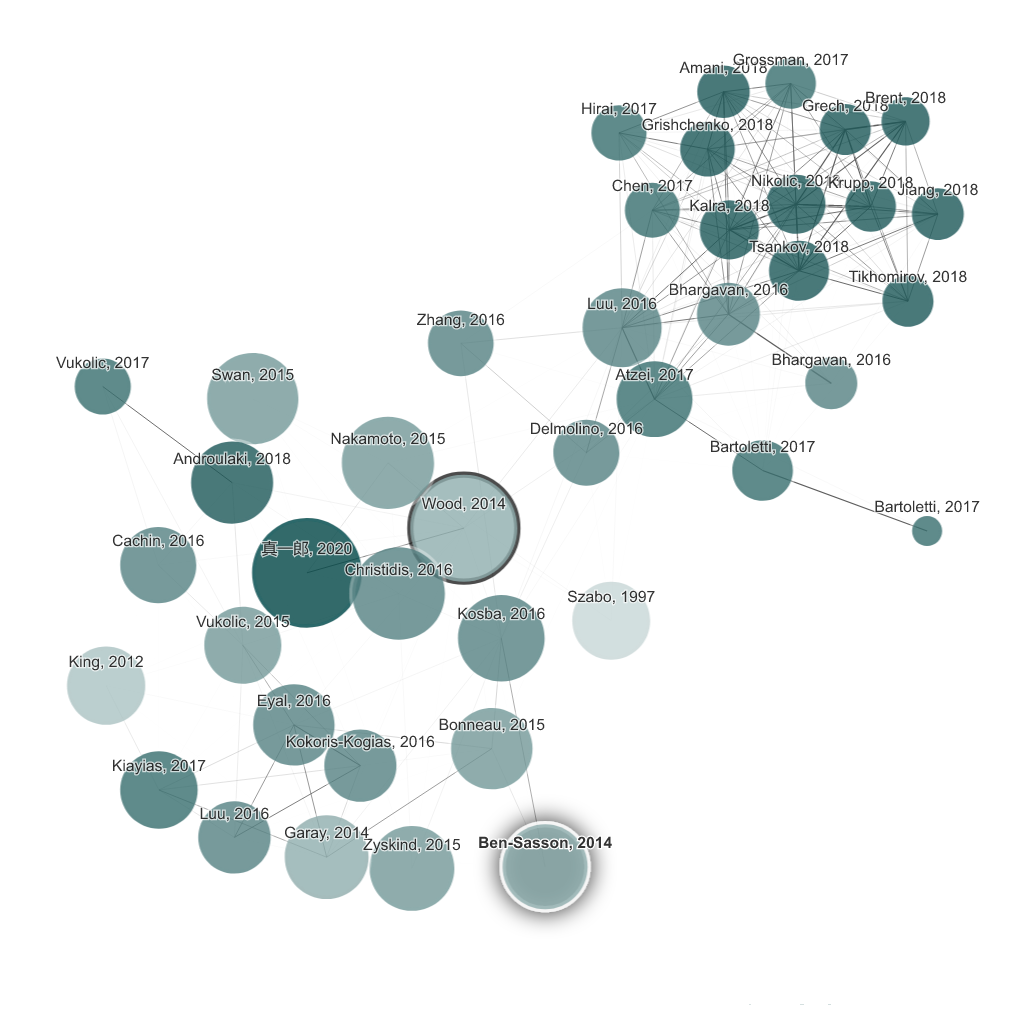
The graph view is where Connected Papers becomes genuinely useful. Starting from one origin paper, the interface reveals related nodes visually instead of forcing you to infer the field from titles alone. For literature review work, that makes a big difference. You can notice clusters, nearby concepts, and unexpected adjacent works much faster than in a flat results list. This is especially useful when you are entering a new subfield, refining a thesis bibliography, or trying to avoid missing an influential neighboring paper. For people searching for a research paper graph or similar papers graph, this is the feature that justifies the tool.


Annotated screenshot of the official Connected Papers graph view showing the Prior works mode around an origin paper
This graph screenshot matters because it shows how Connected Papers helps users move from one paper to a broader visual neighborhood instead of relying on isolated search hits. Click the image to open the full-size screenshot.

The official product pages also highlight Prior Works and Derivative Works, and those two views are more useful than they sound. Prior Works helps surface important ancestor papers in the area, while Derivative Works helps you move toward reviews, follow-up papers, and newer state-of-the-art directions. That is practical because literature review is rarely only about finding papers that look similar right now. Often you need both the deeper foundations and the more recent outcomes. A Connected Papers prior works workflow and derivative works workflow can save a lot of time if your seed paper is well chosen.


Annotated screenshot of the official Connected Papers graph view showing the Derivative works mode for follow-up literature discovery
The derivative view screenshot is useful because it shows that the tool is not only about neighboring papers. It also supports looking forward toward later work and review-oriented follow-ups. Click the image to open the full-size screenshot.

Another good detail is the List view. A graph is excellent for orientation, but it is not always the best format when you want to compare titles, citations, years, and similarity in a more systematic way. The official list mode solves that problem by giving users a more traditional reading queue with downloadable structure. That makes Connected Papers more practical for thesis writing, team literature scans, and any workflow where visual discovery eventually needs to become an ordered shortlist. This graph-to-list transition is one of the reasons the tool feels usable rather than purely impressive.


Annotated screenshot of the official Connected Papers list view showing download support and similarity-to-origin comparison columns
This list view screenshot earns its place because it shows how Connected Papers can move from visual exploration into a more practical reading or export workflow. Click the image to open the full-size screenshot.

The pricing page adds one practical boundary that users should know before depending on the service heavily. The official free plan allows 5 graphs per month, while the paid plans unlock unlimited graphs for academic or business use. That limit is not just a pricing detail. It shapes how suitable the tool is for occasional literature checks versus full-scale review work. If you only need a few targeted explorations, the free tier may be enough. If you plan to use Connected Papers regularly across many topics, the graph limit becomes part of the real decision.


Annotated screenshot of the official Connected Papers pricing page showing the free graph limit and unlimited premium plans
The pricing screenshot is valuable because graph limits directly affect whether Connected Papers stays an occasional discovery tool or becomes part of a regular literature review workflow. Click the image to open the full-size screenshot.

Our grounded take is that Connected Papers is best for researchers, graduate students, and serious readers who already know enough to choose a good seed paper but need help seeing the surrounding landscape. It is weaker for people who want full-text explanations, PDF annotation, reference management, or exhaustive keyword search as a primary workflow. In other words, it is a strong map, not a full research operating system. Used that way, it can be a very effective literature review aid and bibliography discovery tool. Used with unrealistic expectations, it can feel narrower than it really is.

Setup / Usage Guide

Installation steps, usage guidance, and common notes are maintained here.

The best way to use Connected Papers is to start with one representative seed paper, not with a vague topic name. The tool becomes much more useful when the origin paper is already close to the literature area you care about.

  1. Open the official Connected Papers site from the website button on this page and decide on one seed paper first. A good seed paper is not just famous. It should be genuinely close to the topic, method, or debate you want to map.
  2. Use a reliable identifier when possible. The homepage accepts paper DOI, arXiv links, paper URLs, titles, Semantic Scholar URLs, and PubMed URLs. If the title is ambiguous, DOI or a direct paper link usually reduces noise.
  3. Build the first graph and resist the urge to interpret every connection as a direct citation. The official About page explains that Connected Papers is not a citation tree. Treat it as a similarity map that helps you orient yourself inside a research neighborhood.
  4. Spend the first minutes looking for clusters and obvious anchor papers. Note which nodes seem central, which groups look close to the origin, and whether the graph reveals subtopics you were not considering before.
  5. Open the Prior Works view next. This is the right place to look for older foundational papers, influential ancestors, and works you may need if you are building the background section of a literature review or thesis.
  6. Then switch to Derivative Works. Use it to look for follow-up papers, reviews, and newer state-of-the-art directions that help you move forward from the seed paper instead of only backward.
  7. When the graph gives you a promising area, switch to List view. The list is much better for comparing titles, years, citations, and similarity in a more disciplined way, especially when you are deciding what to read next.
  8. Download or record the most promising papers only after the graph and list both agree that they deserve attention. A graph can surface interesting candidates, but reading decisions should still be backed by abstract and relevance checks.
  9. If you are building a bibliography, repeat the process with one or two more seed papers from different parts of the field. This often exposes gaps in your reading that keyword search alone would not make obvious.
  10. Watch the free usage limit. The official pricing page allows 5 graphs per month on the free plan, so use your graphs deliberately instead of spending them on weak or overly broad seed papers.
  11. Do not expect Connected Papers to replace full research workflow tools. It does not read papers for you, manage references end to end, or guarantee comprehensive coverage. Its job is to improve discovery and orientation.
  12. After several real searches, decide whether it belongs in your workflow. Keep it if visual mapping consistently helps you discover relevant papers faster and build better reading paths. Skip it if your work depends more on full-text reading, direct annotation, or exhaustive database querying than on graph-based exploration.

A practical evaluation order works well for most users: choose a strong seed paper first, read the graph as a similarity map second, inspect Prior Works third, inspect Derivative Works fourth, then use List view and the free graph budget carefully. That sequence reveals quickly whether Connected Papers is becoming a real literature review aid or just an interesting visual novelty.

Related Software

Keep exploring similar software and related tools.