Flameshot
Category PC Essentials
Published 2026-03-31

Overview

This section highlights the core features, use cases, and supporting notes.

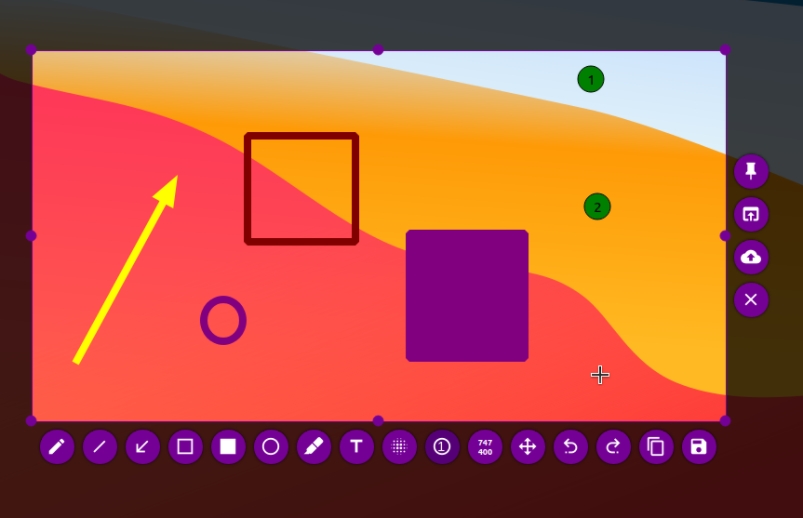
Flameshot is a screenshot tool for users who need to capture, mark up, and share what matters without opening a full image editor afterward. Its real advantage is speed: region capture, arrows, blur, text, and saving can happen in one flow, which makes it especially useful for support, docs, and bug reporting.

Flameshot solves a specific problem well: the capture is usually not the end of the task. Most people taking screenshots for work also need to point at something, hide something, or explain something immediately after the shot.

It fits support staff, writers, teachers, QA testers, and anyone who shares interface feedback often. If you mostly capture an image and keep it untouched, the benefit is smaller. If annotation is part of the job, Flameshot becomes far more compelling.

What makes it worth installing is the short path from screenshot to usable communication. Arrows, rectangles, text labels, blur, and fast export are the features that save time, not the screenshot itself.

The limit is that Flameshot is not a complete graphics editor. For long edits, layered composition, or pixel-level work, another tool will still be better. The right expectation is fast visual explanation, not full image production.

This site recommends Flameshot when screenshots are part of your working language. Set the hotkey, save path, and a few annotation defaults first. If it shortens your capture-to-share loop within a day or two, it is worth keeping.


Setup / Usage Guide

Installation steps, usage guidance, and common notes are maintained here.

  1. Download Flameshot from the official project site. Use the official Windows package so you start from the current maintained release.
  2. Install it and launch it once from the Start menu. This lets Windows register the app properly before you try assigning shortcuts.
  3. Set your capture hotkey early. Flameshot is most valuable when capture starts faster than your current method, so shortcut setup should happen before deeper tweaking.
  4. Choose a save folder that matches your real workflow. A screenshot tool becomes annoying quickly when every image lands in the wrong place.
  5. Test the annotation tools on one real example. Draw an arrow, add text, blur private data, and save the result. If those steps feel smooth, the tool is already proving its purpose.
  6. Check whether clipboard copy or direct save fits you better. Some users mostly paste into chat or docs, while others need an archived file every time.
  7. Watch for conflicts with other screenshot shortcuts. Windows, graphics drivers, or other tools can intercept the same keys, so fix that early if capture feels inconsistent.
  8. Keep it if it removes the extra edit step. That is the practical test. If you still open another tool for every marked screenshot, your setup needs more work or a different app.

Related Software

Keep exploring similar software and related tools.