This section highlights the core features, use cases, and supporting notes.
Fork is most useful when it is judged as a paid desktop Git client built for everyday repository work rather than as a decorative GUI that hides Git behind large buttons. The official Fork homepage, About page, buy page, license page, blog, Quick Launch post, Collapsible git graph post, Fork for Windows 1.48 release notes, Fork for Windows 1.38 release notes, and Fork 1.0.79 release notes checked on April 19, 2026 all point to a practical client for Mac and Windows with real workflow depth around diffs, branch movement, history navigation, merge conflict handling, rebase actions, pull requests, LFS workflows, and repository visibility. That positioning matters because Fork should not be evaluated only on whether it can stage a file or create a commit. The homepage already highlights direct downloads for Mac and Windows, repository manager, working directory changes, side by side diff, GitHub notifications, merge conflicts, and interactive rebase. The About page makes the product origin more believable by describing Fork as a tool built by developers for their own daily use, while the buy and license pages make it clear that this is a paid desktop utility with a free evaluation path rather than a fully free forever client. What keeps Fork worth considering is the release-note trail. The official blog and release posts show features such as Quick Launch command palette actions, collapsible commit graph navigation, partial stash, drag and drop merge and rebase, pull request creation, LFS locking, side by side diff, image comparison modes, bugtracker links, quick interactive rebase actions, and sorting branches and tags. That mix makes Fork feel like a real productivity tool for people who already understand Git and want clearer visual control without giving up workflow power. Our grounded judgment is that Fork is strongest for developers and technical contributors who already understand version-control basics and want a cleaner faster desktop workflow for repository review, branch movement, diff inspection, and day-to-day Git operations. It is a weaker fit for users who require a fully free or open-source Git client, a pure command-line workflow, or a browser-based collaboration system. Fork looks most defensible when the real need is a serious desktop Git workspace that can save time without pretending Git itself has become simple.
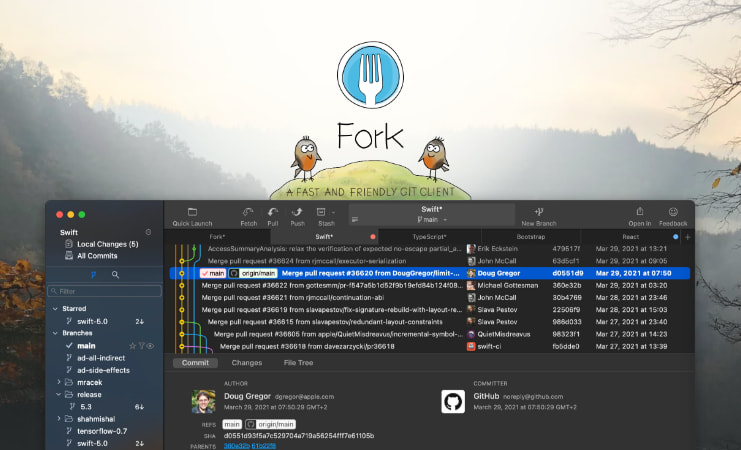
The current English page for Fork is still too thin for what Fork now shows across its official surfaces. The homepage checked on April 19, 2026 presents Fork as a fast and friendly git client for Mac and Windows and surfaces direct downloads, free evaluation, repository manager, working directory changes, side by side diff, GitHub notifications, merge conflicts, and interactive rebase. That matters because Fork should be judged as a serious desktop Git workflow tool rather than as a thin wrapper around a few common Git buttons.
The homepage matters because it frames Fork as a practical desktop Git workspace with visible download and workflow depth.
The official About Us, Buy, and License pages make the product shape clearer. The About page says Fork started as a project the developers built for themselves and friends because they wanted a Git client that would be easy to use daily. The buy page describes a one-time desktop purchase with personal and commercial use, while the license page says users can evaluate for free but need a paid license for long-term use, with one user on up to three machines. That matters because Fork is a paid desktop utility, and the license model is part of whether it fits a real team or personal workstation setup.
The About page matters because Fork presents itself as a tool built by developers for daily repository work.The buy page matters because Fork is sold as a paid desktop utility with personal and commercial use terms.The license page matters because long-term use rights are explicit and should be part of the comparison with other Git clients.
The official blog is the strongest sign that Fork is more than a static installer. It shows an ongoing release-note surface with feature explanations and product changes. That matters because Git clients are only as useful as their continuing workflow improvements, especially once repositories get messy and daily operations become repetitive.
The blog matters because it gives Fork a visible maintenance trail instead of leaving it as a frozen landing page.
The feature posts make Fork’s workflow depth easier to judge. The Quick Launch view post shows a command palette for actions such as branch checkout, file history, and custom commands. The Collapsible git graph post shows how Fork tries to reduce graph noise so users can focus on the branches that matter. That matters because a graphical Git client earns its place when it helps users move faster through real repository complexity, not when it merely restyles a few common Git operations.
The Quick Launch post matters because Fork is trying to compress frequent Git actions into a faster workflow.The collapsible graph post matters because Fork is explicitly solving messy repository history navigation.
The release notes deepen that picture. Fork for Windows 1.48 added partial stash, drag and drop merge and rebase, pull request creation for major hosting platforms, LFS lock and unlock, visible git command output, and remote connection testing. Fork for Windows 1.38 added side by side diff, bugtracker links, image comparison modes, filters for branches and changed files, and quicker interactive rebase actions. Fork 1.0.79 on the Mac side highlighted LFS image preview, improved status control, bugtracker references, quick interactive rebase actions, and sorting branches and tags. That matters because these are daily workflow features for people who already do real repository work.
The Windows 1.48 notes matter because they show Fork investing in concrete Git operations instead of only cosmetic polish.The Windows 1.38 notes matter because visual comparison and navigation quality are core reasons to use a Git GUI.The Mac release notes matter because Fork documents workflow improvements across both supported desktop platforms.
Our grounded judgment is that Fork is strongest for developers and technical contributors who already understand version-control basics and want a cleaner faster desktop workflow for repository review, branch movement, diff inspection, and day-to-day Git operations. It is a weaker fit for users who require a fully free or open-source Git client, a pure command-line workflow, or a browser-based collaboration system. Fork looks most defensible when the real need is a serious desktop Git workspace that can save time without pretending Git itself has become simple.
Setup / Usage Guide
Installation steps, usage guidance, and common notes are maintained here.
The best way to start with Fork is to treat it as a productivity layer for people who already understand Git basics, not as a replacement for Git judgment. The official Fork materials checked on April 19, 2026 show a desktop client built around downloads for Mac and Windows, paid licensing with free evaluation, visual diff work, branch navigation, repository graph clarity, pull request helpers, LFS support, and faster everyday actions.
Start from the official homepage at https://git-fork.com/ so you evaluate Fork in the way the product positions itself: a fast and friendly Git client for Mac and Windows.
If you are using Windows, use the official Windows installer exposed by the site at https://cdn.fork.dev/win/Fork-2.16.1.exe. Stay on official download paths instead of third-party mirrors.
Read the buy and license pages before rolling Fork out broadly. It is a paid desktop utility with free evaluation, so licensing should be part of the decision early.
Add one repository you already understand well. Fork is easier to judge when the branch structure, remotes, and recent changes are already familiar.
Review the working directory, commit list, and side by side diff first. These surfaces tell you quickly whether Fork will actually improve your daily Git reading and review workflow.
Try the Quick Launch flow for actions like branch checkout and file history once the basics feel stable. This is one of the clearest signals that Fork can save time for experienced users.
Use graph-heavy repositories to test the Collapsible git graph feature. Fork should be judged partly on whether it makes complex branch history easier to reason about.
Before trusting advanced actions on important branches, test partial stash, drag and drop merge or rebase, and pull request creation inside a safe repository or non-critical branch.
If your team uses Git LFS, issue trackers, or image-heavy repositories, explicitly test the related release-note features. Those details are where Fork starts to justify itself over simpler clients.
Keep one principle in mind throughout evaluation: a Git GUI only helps when it makes repository state clearer, not when it encourages faster clicks without understanding consequences.
Finish the evaluation with one practical question: does Fork make your real repository work faster and easier to inspect, or would a free client or direct terminal workflow already cover the job without extra licensing?
A practical Fork setup usually means starting from the official download and license pages, proving one familiar repository first, then testing diff quality, branch navigation, graph clarity, and a few advanced actions before standardizing it as part of your Git workflow.
Related Software
Keep exploring similar software and related tools.
Node.js is a free, open-source, cross-platform JavaScript runtime that lets you run JavaScript for servers, APIs, command-line tools, scripts, and build workflows, backed by npm and a large first-party documentation ecosystem. Its real strength is not only backend JavaScript, but the way runtime, package management, CLI tooling, REPL workflows, and a built-in test runner can reduce setup friction for developers who want one practical platform from prototype to production.
Python is a general-purpose programming language that stays popular because it is readable, widely taught, and useful across automation, data work, AI, backend services, and scripting. It is one of the easiest languages to start with while still being powerful enough for serious long-term projects.
Visual Studio Code is worth recommending when it is judged as a practical development workspace instead of only as another text editor. The official materials checked on April 22, 2026 still position VS Code through its main site, documentation hub, download page, monthly updates, getting-started guide, themes guide, CLI guide, terminal basics, source-control overview, and settings-sync docs. That combination matters because many users do not only need a place to open files. They need an editor that can scale from note-sized edits to real development tasks with extensions, Git workflow, terminal access, language support, and a setup path that stays understandable for new and experienced users. VS Code is strongest for developers, technical learners, script writers, DevOps users, and general coding work where flexibility matters more than a giant IDE. It is weaker for readers who need every heavyweight enterprise IDE feature out of the box or who want an editor with almost no customization choices at all. Our grounded judgment is that VS Code still deserves to be recommended as one of the safest default development workspaces for Windows users because it balances approachability, extension depth, and official guidance better than many alternatives.
Rust is worth recommending when it is judged as a language-plus-toolchain ecosystem instead of only as another programming language homepage. The official materials checked on April 22, 2026 still position Rust through its main site, install guide, Rust book, Cargo book, Rust By Example, the installation chapter, the Hello Cargo chapter, the standard library docs, Clippy docs, and the Rust Playground. That combination matters because many users do not only need syntax. They need a practical route from installation to building, formatting, linting, learning, and testing real code. Rust is strongest for developers who care about performance, correctness, tooling quality, and long-term maintainability, especially when they are willing to learn a stricter model than scripting languages usually require. It is weaker for readers who want the easiest possible beginner syntax or who need instant scripting convenience more than disciplined compiled-language workflow. Our grounded judgment is that Rust still deserves to be recommended as one of the most complete modern toolchain experiences for systems and performance-conscious development because its official learning and tooling path remains unusually strong.
Standard Notes is a note-taking app for users who care about private, cross-device notes and a more security-conscious writing environment than ordinary cloud note apps usually provide. It is especially useful for users who want serious long-term notes, journaling, and personal knowledge capture with privacy in mind. Its strongest value is the privacy-first note model, while the main tradeoff is that the product feels more deliberate and structured than ultra-minimal note apps.
nomacs is an open-source Windows image viewer for people who want faster browsing, broad format support, and real image-comparison tools without jumping straight into a heavy photo editor or cataloging suite. Its real value comes from metadata and histogram panels, folder and archive browsing, sync and overlay comparison, basic editing tools, portable Windows deployment, and practical workflows for testing new image formats when a file does not open cleanly the first time.
foobar2000 is a modular Windows music player for users who care more about local library control, format support, tagging, conversion, and playback workflow than about subscription streaming polish. Its real value comes from lightweight performance, component-based expansion, strong local collection handling, DSP management, format conversion, internet radio and network playback features, and a stable-versus-preview release path that stays transparent on the official site.
Ditto is a Windows clipboard history manager for people who copy and paste all day and need more than the operating system's basic single-clipboard memory can offer. Its real value comes from local-first storage, quick keyboard recall, plain-text paste, snippet groups, independent copy buffers, portable and winget install paths, and advanced options such as local-network sharing, command-line actions, and copy or paste scripting.