This section highlights the core features, use cases, and supporting notes.
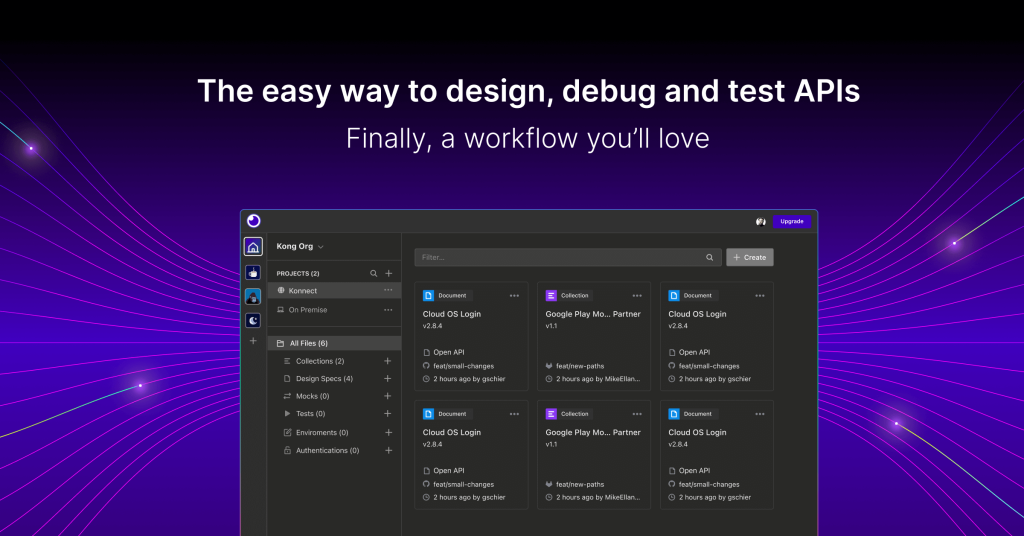
Insomnia is most useful when it is judged as an open-source collaborative API development platform with request workflows, collections, environments, Git Sync, plugins, and mock servers rather than as only a simple REST client. The official Insomnia homepage, download page, pricing page, docs introduction, requests page, collections page, environments page, Git Sync page, plugins page, and mocks page checked on April 19, 2026 all point to a broader API workflow tool for HTTP, REST, GraphQL, gRPC, SOAP, and WebSockets. That positioning matters because Insomnia keeps describing itself as more than a request sender. The homepage calls it a collaborative API development platform and says it is a leading open-source platform across several API protocols. The docs introduction says Insomnia is an open-source desktop application that simplifies designing, debugging, and testing APIs. Requests, collections, and environments matter because they define the everyday work surfaces that serious API users rely on repeatedly. What keeps Insomnia worth considering is the practical workflow depth around organization, collaboration, and extensibility. Git Sync matters because it connects API work directly to repositories. Plugins matter because teams can extend the tool instead of staying locked inside built-in behavior. Mocks matter because pre-production API work often depends on simulated responses before a backend is fully ready. The pricing page also matters because it shows the product being sold for broader modern API work at team and scale levels rather than as a throwaway utility. Our grounded judgment is that Insomnia is strongest for developers and technical teams who want one polished tool for API requests, environments, organized collections, collaborative changes, and broader design or testing workflows under an open-source product with a real docs surface. It is a weaker fit for users who only want a tiny one-endpoint tester, a purely local offline note tool, or a workflow that never grows beyond a handful of manual calls. Insomnia looks most defensible when the real need is repeatable API work that benefits from organization, versioning, and extensibility.
The current English page for Insomnia is still too thin for what Insomnia now shows across its own official product and documentation surfaces. The homepage checked on April 19, 2026 calls Insomnia The Collaborative API Development Platform and says it is a leading open-source API development platform for HTTP, REST, GraphQL, gRPC, SOAP, and WebSockets. That matters because Insomnia should not be judged like a tiny single-purpose request sender. It is trying to support broader API work.
The homepage matters because it frames Insomnia as a broader API platform, not just a basic request tab.
The official Download and Pricing pages reinforce that larger product posture. The download page presents Insomnia as an API client and OpenAPI design tool, while the pricing page says it offers flexible pricing for modern API development and API design at any scale. That matters because Insomnia is being sold for repeated professional use and team growth, not only for occasional local experiments.
The download page matters because Insomnia still expects to be used as a dedicated developer tool rather than only as a web demo.The pricing page matters because Insomnia is positioned for larger API workflows than a disposable utility normally supports.
The official docs introduction makes the product even clearer. Kong describes Insomnia there as an open-source desktop application that simplifies designing, debugging, and testing APIs. That matters because the documentation explains Insomnia in the same practical terms engineers actually use to judge API tools, not only in marketing language.
The docs introduction matters because it explains Insomnia in practical engineering terms rather than only in slogans.
The official Requests, Collections, and Environments pages show what the daily workflow really looks like. Requests are the core send-and-configure surface, collections organize work into reusable groups, and environments let teams reuse values across multiple requests. That matters because API tools earn their place through repeated operational efficiency, not through feature lists alone.
The requests page matters because a serious API tool still has to excel at the everyday request flow first.The collections page matters because organized repeatable API work is more valuable than isolated one-off calls.The environments page matters because reusable context is essential for real API work across stages and teams.
The official Git Sync page pushes Insomnia toward team workflows. It says users can connect Insomnia directly to a Git repository. That matters because versioned API assets are easier to review, share, and trust when they fit directly into normal repository-based engineering work rather than staying buried inside one local app state.
The Git Sync page matters because Insomnia is designed to fit versioned team workflows, not only personal local use.
The official Plugins and Mocks pages add two more reasons Insomnia stands out. Plugins mean teams can extend the tool instead of relying only on built-in behaviors, while mock servers support API work before every live endpoint is ready. That matters because modern API development often depends on extensibility and pre-production simulation, not only live calls to finished services.
The plugins page matters because extensibility helps Insomnia adapt to more than one predefined API workflow.The mocks page matters because API tools are more useful when they support testing before live backends are fully ready.
Our grounded judgment is that Insomnia is strongest for developers and technical teams who want one polished tool for API requests, environments, organized collections, collaborative changes, and broader design or testing workflows under an open-source product with a real docs surface. It is a weaker fit for users who only want a tiny one-endpoint tester, a purely local offline note tool, or a workflow that never grows beyond a handful of manual calls. Insomnia looks most defensible when the real need is repeatable API work that benefits from organization, versioning, and extensibility.
Setup / Usage Guide
Installation steps, usage guidance, and common notes are maintained here.
The best way to start with Insomnia is to treat it as a fuller API workflow tool rather than as only a single-request client. Insomnia pages checked on April 19, 2026 show a product built around protocol breadth, structured requests, collections, environments, Git-connected collaboration, plugins, and mock servers.
Start from the official homepage at https://insomnia.rest/ so you evaluate Insomnia in its intended frame: collaborative API development across several protocols.
Use the official download page to install the tool rather than relying on third-party bundles. A developer tool is easier to trust when the install path is official and current.
Read the docs introduction before building a large workspace. It gives the clearest official explanation of Insomnia as a design, debugging, and testing tool.
For the first real test, create one practical request that mirrors a real endpoint you use regularly. Insomnia is easier to judge on actual API work than on random demo calls.
As soon as you have more than a few endpoints, organize them into collections. Collections are part of how Insomnia becomes a repeatable workspace instead of a loose set of tabs.
Set up environments early if you work across local, staging, and production values. Reusable variables are one of the biggest quality-of-life gains in a serious API tool.
If your team stores API assets in repositories, test Git Sync before going deeper. Repository-connected workflows can change whether the tool fits team review and collaboration habits.
Look at plugins only after the core workflow feels stable. Extensibility is powerful, but it is more useful once the base request and environment flow already makes sense.
If you design or test APIs before backends are finished, use mock servers on one realistic scenario. Mock support is one of the clearest ways Insomnia can help earlier in the API lifecycle.
Check the pricing page before rolling the tool out more broadly. It is better to understand scale and team assumptions early than after workspaces are already established.
Finish the evaluation with one practical question: does Insomnia actually reduce friction across your API workflow, or would a simpler request-only tool already cover your real needs with less structure?
A practical Insomnia setup usually means starting with the official download and docs path, testing one real request, then adding collections, environments, Git Sync, plugins, or mocks only where your workflow genuinely benefits from them.
Related Software
Keep exploring similar software and related tools.
Node.js is a free, open-source, cross-platform JavaScript runtime that lets you run JavaScript for servers, APIs, command-line tools, scripts, and build workflows, backed by npm and a large first-party documentation ecosystem. Its real strength is not only backend JavaScript, but the way runtime, package management, CLI tooling, REPL workflows, and a built-in test runner can reduce setup friction for developers who want one practical platform from prototype to production.
Python is a general-purpose programming language that stays popular because it is readable, widely taught, and useful across automation, data work, AI, backend services, and scripting. It is one of the easiest languages to start with while still being powerful enough for serious long-term projects.
Visual Studio Code is worth recommending when it is judged as a practical development workspace instead of only as another text editor. The official materials checked on April 22, 2026 still position VS Code through its main site, documentation hub, download page, monthly updates, getting-started guide, themes guide, CLI guide, terminal basics, source-control overview, and settings-sync docs. That combination matters because many users do not only need a place to open files. They need an editor that can scale from note-sized edits to real development tasks with extensions, Git workflow, terminal access, language support, and a setup path that stays understandable for new and experienced users. VS Code is strongest for developers, technical learners, script writers, DevOps users, and general coding work where flexibility matters more than a giant IDE. It is weaker for readers who need every heavyweight enterprise IDE feature out of the box or who want an editor with almost no customization choices at all. Our grounded judgment is that VS Code still deserves to be recommended as one of the safest default development workspaces for Windows users because it balances approachability, extension depth, and official guidance better than many alternatives.
Rust is worth recommending when it is judged as a language-plus-toolchain ecosystem instead of only as another programming language homepage. The official materials checked on April 22, 2026 still position Rust through its main site, install guide, Rust book, Cargo book, Rust By Example, the installation chapter, the Hello Cargo chapter, the standard library docs, Clippy docs, and the Rust Playground. That combination matters because many users do not only need syntax. They need a practical route from installation to building, formatting, linting, learning, and testing real code. Rust is strongest for developers who care about performance, correctness, tooling quality, and long-term maintainability, especially when they are willing to learn a stricter model than scripting languages usually require. It is weaker for readers who want the easiest possible beginner syntax or who need instant scripting convenience more than disciplined compiled-language workflow. Our grounded judgment is that Rust still deserves to be recommended as one of the most complete modern toolchain experiences for systems and performance-conscious development because its official learning and tooling path remains unusually strong.
Obsidian is a private knowledge and note-taking app for users who want local file ownership, durable Markdown notes, and a workflow that can grow from simple writing into linked thinking, clipping, visual mapping, syncing, publishing, and plugins. Its real value comes from offline-first storage, open file formats, flexible vault structure, Canvas for spatial thinking, Web Clipper for capture, optional Sync and Publish services, and a large plugin ecosystem that can be added gradually instead of forced from day one.
VLC media player is a versatile media player for Windows users who want broad format support, reliable playback, and a long-standing desktop tool that handles local video and audio without much fuss. It is especially useful for mixed media libraries, downloaded files, and situations where default players fail to open or play something cleanly. Its value comes from compatibility and practicality, though users seeking a highly polished media-library experience may prefer a more specialized player.
TortoiseGit is a Windows shell extension that brings Git actions into Explorer through context menus, overlays, and visual repository controls. It is a good fit for users who want a graphical Git workflow on Windows without living in the terminal for every commit, branch, or diff.
GitKraken is still worth recommending when it is judged as a visual Git desktop client for repository history, pull-request follow-through, multi-repo organization, and merge-conflict handling instead of as only a prettier shell around basic Git commands. The official materials checked on April 21, 2026 present GitKraken Desktop through a clear Windows download path, a visual commit graph, Launchpad for issues and pull requests, Workspaces for multi-repo context, a visual 3-way merge tool, enterprise-oriented security controls, a public help center, current release notes, and a visible product roadmap. That combination matters because many developers do not struggle with Git because commands are unavailable; they struggle because repository context, merge state, and review work become hard to see at the right moment. GitKraken is strongest for developers and teams who want Git work to stay legible across branches, repositories, pull requests, and review queues without forcing every action through raw terminal memory. It is weaker for readers who prefer a purely CLI workflow or who only need the smallest possible local Git wrapper, but our grounded judgment is that GitKraken still earns its place when the real need is visual Git clarity plus day-to-day team workflow support.