Overview

This section highlights the core features, use cases, and supporting notes.

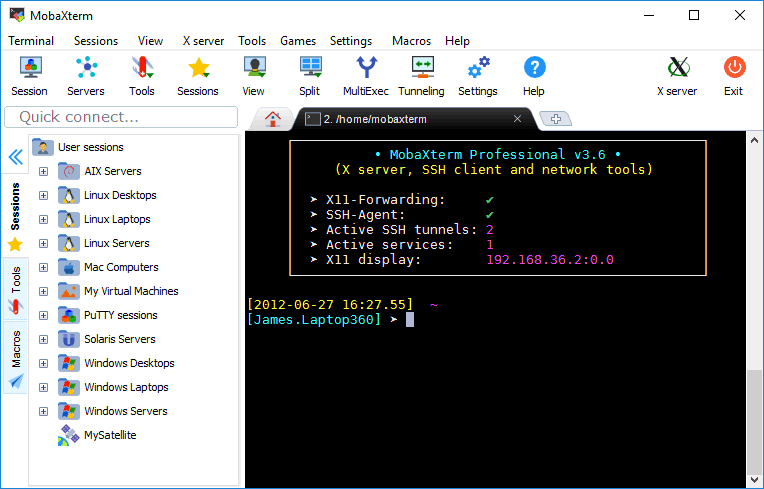
MobaXterm is still worth recommending when it is judged as a Windows remote-computing toolkit that combines terminal access, SSH, X11, RDP, VNC, file transfer, plugins, and administrative convenience in one desktop application instead of as only another SSH window. The official materials checked on April 21, 2026 still present MobaXterm through its main product page, the official download route, features page, documentation, plugins, animated demo, contact page, license page, export rules page, and the broader Mobatek company site. That combination matters because many Windows-based administrators, developers, and technical support users do not only need one shell; they need a practical place to reach many kinds of remote sessions and supporting tools without stitching together several separate utilities. MobaXterm is strongest for Windows users who want an all-in-one remote operations toolbox with built-in convenience and broad protocol coverage. It is weaker for readers who only need the smallest possible SSH client, but our grounded judgment is that MobaXterm still deserves to be recommended when the real need is broad remote-access capability in one Windows-oriented workspace.

The current English page for MobaXterm needs a fuller rewrite because the official materials checked on April 21, 2026 show a product with a much clearer role than a thin SSH client label suggests. MobaXterm is most useful when it is judged as a Windows remote-computing toolkit for mixed protocol access and administrative convenience, not only as a single terminal window.

Annotated reference image based on the official MobaXterm homepage highlighting the Windows remote toolkit positioning
The main page matters because it positions MobaXterm as a broader remote toolkit rather than a minimal shell app.

The main MobaXterm page still presents the product as a free Xserver and tabbed SSH client for Windows, and that is a useful starting frame. The stronger value is not only SSH. The stronger value is that several remote-access needs can stay inside one Windows-focused environment.

Annotated reference image based on the official MobaXterm download page highlighting the first-party Windows route
The download page matters because remote-access software should begin from a clear first-party Windows route.

The official download page matters because infrastructure-facing tools should be installed from a trusted source. A direct vendor route reduces uncertainty and makes version selection easier for Windows users who need the toolkit for ongoing work.

Annotated reference image based on the official MobaXterm features page highlighting protocol breadth and toolkit scope
The features page matters because broad protocol and tool coverage is one of MobaXterm’s defining practical advantages.

The features page is one of the clearest reasons to recommend MobaXterm. SSH, telnet, RDP, VNC, X11, and related features give the tool a broader remote-operations role than a plain shell client. That matters for Windows users who would otherwise juggle several utilities.

Annotated reference image based on the official MobaXterm documentation page highlighting first-party learning and setup guidance
The documentation page matters because MobaXterm should be learned through official workflow guidance, not only through experimentation.

The documentation page matters because an all-in-one toolkit can feel dense if users are left to discover everything by guesswork. Official documentation reduces first-run confusion and makes the product easier to adopt for new administrators and technical staff.

Annotated reference image based on the official MobaXterm plugins page highlighting extendable remote workflow support
The plugins page matters because MobaXterm gains practical value when extra tooling can be added selectively.

The plugins page matters because MobaXterm is not locked to one fixed capability set. The official extension path still shows room for adding functionality, which makes the toolkit more adaptable for different technical environments.

Annotated reference image based on the official MobaXterm animated demo page highlighting interface and workflow style
The demo page matters because a quick view of interface and workflow can reduce uncertainty before first use.

The animated demo is useful because MobaXterm is the kind of tool many users want to judge visually before committing to it. A toolkit with many panels and session types is easier to evaluate when the vendor offers a product demonstration path.

Annotated reference image based on the official MobaXterm contact page highlighting official support visibility
The contact page matters because official support visibility is part of product trust for technical remote tools.

The contact page is another trust signal because technical remote software becomes much easier to keep when official support and vendor contact routes are visible. That matters more here than it would for a casual app.

Annotated reference image based on the official MobaXterm license page highlighting usage model and edition fit
The license page matters because MobaXterm should be judged partly on whether its usage model fits the intended environment.

The license page matters because many users first try MobaXterm personally and later consider it for wider organizational use. Licensing context is part of whether the product truly fits a given environment.

Annotated reference image based on the official MobaXterm export rules page highlighting formal product compliance context
The export rules page matters because infrastructure-facing software is often judged partly on how formally the vendor handles compliance context.

The export rules page is not the first thing a casual user looks for, but it still adds trust. Formal compliance and distribution context are signs that the product is treated as serious infrastructure-facing software, not as a hobby download.

Annotated reference image based on the official Mobatek company page highlighting Windows system and network software context
The vendor page matters because product trust is stronger when the broader company context is visible, not only one product microsite.

The broader Mobatek company page completes the picture by showing that MobaXterm sits inside a Windows system and network software context. That helps users judge the product as part of a vendor focus, not just as a standalone landing page.

Our grounded judgment is that MobaXterm is strongest for Windows users who want a broad remote toolbox with SSH, X11, remote desktop access, and related convenience features in one place. It is weaker for readers who only need the smallest possible SSH client with almost no surrounding workflow. Judged on the official materials available on April 21, 2026, MobaXterm still deserves to be recommended as a Windows remote-operations toolkit, not as a simple terminal app.


Setup / Usage Guide

Installation steps, usage guidance, and common notes are maintained here.

The best way to start with MobaXterm is to treat it as a Windows remote toolbox and keep the first setup focused on one or two real session types instead of trying every feature immediately. The official materials checked on April 21, 2026 make the order clear: install from the official download page, understand the feature scope, open one SSH or remote session first, use the documentation when anything feels dense, and only then explore plugins or broader administrative workflow.

  1. Start from the official MobaXterm home page at https://mobaxterm.mobatek.net/ so you understand the product as a remote-computing toolkit, not only as an SSH client.
  2. Use the official download page at https://mobaxterm.mobatek.net/download.html for Windows installation. Avoid unofficial repost packages for software used in remote infrastructure work.
  3. Before launching into many session types, skim the official features page. This helps you understand what MobaXterm is actually trying to consolidate for Windows users.
  4. On your first day, create only one real connection, such as a simple SSH host you already know how to reach. First-use confidence matters more than feature coverage.
  5. If you also need X11, RDP, or VNC workflows, add them only after the first session behaves as expected. MobaXterm is broad, but it does not need to be learned all at once.
  6. Use the official documentation whenever a setting or panel feels unclear. A toolkit this broad is easier to keep when the learning path comes from the vendor instead of from scattered guesses.
  7. If file transfer, plugins, or extra tools matter to your workflow, review the official plugins page only after the base remote session setup already feels stable.
  8. Watch the official demo if you are onboarding someone new. It is often easier to judge interface fit visually before turning every option into a live configuration exercise.
  9. If you are thinking about wider use in a team or organization, read the license page before standardizing on the tool. Edition fit matters more once usage scales.
  10. In more controlled environments, also note the official export rules and vendor context. Those pages are not everyday workflow guides, but they do matter for grounded product evaluation.
  11. Keep your saved sessions organized from the beginning. A remote toolkit becomes harder to trust when hosts and connection habits turn into a messy list.
  12. Do not install every plugin immediately. Add only what solves a real operational need so the interface stays understandable.
  13. If you rely mostly on one protocol, ask honestly whether you need the entire MobaXterm toolbox. Its value is highest when you actually benefit from the combined feature set.
  14. After a short trial, decide whether MobaXterm is reducing the number of separate remote tools you juggle on Windows. That is one of the clearest tests of fit.
  15. Keep one practical rule in mind: MobaXterm should reduce remote-work friction. If it feels like extra complexity without saving time, your needs may be simpler than the product's full scope.

A practical MobaXterm setup usually means installing from the official vendor route, understanding the product's broader feature scope before heavy customization, proving one SSH or remote session works first, using the official documentation whenever the interface feels dense, adding plugins selectively, and checking license or compliance context before wider deployment. That is how MobaXterm becomes a useful Windows remote toolbox instead of a crowded app full of unused options.

Related Software

Keep exploring similar software and related tools.