Overview

This section highlights the core features, use cases, and supporting notes.

Termius is still worth recommending when it is judged as a modern SSH client and remote-access workspace for saved hosts, SFTP, port forwarding, snippets, key management, and secure sync rather than as a plain terminal replacement. The official materials checked on April 21, 2026 show Termius across its Windows download page, installation docs, quick start, connection guide, SFTP workflow, port forwarding and tunneling docs, snippets guide, SSH keys and certificates guide, and enterprise-grade security page. That combination matters because remote-access work becomes messy when hosts, files, tunnels, and credentials are scattered across unrelated tools or remembered only through habits. Termius is strongest for developers, DevOps users, and administrators who move across servers and devices enough to benefit from structured host management instead of ad hoc terminal windows. It is weaker for readers who only need the simplest local SSH command on one machine, but our grounded judgment is that Termius deserves to be recommended when the real need is repeatable remote operations with organized hosts, files, tunnels, and credentials.

The current English page for Termius needs a fuller rewrite because the official materials checked on April 21, 2026 show a product with a much clearer role than a generic terminal label suggests. Termius is most useful when it is judged as a modern remote-access workspace built around hosts, connections, files, keys, and repeatable SSH workflows, not only as a place to open a shell.

Annotated reference image based on the official Termius homepage highlighting the modern SSH client positioning
The main Termius page matters because it explains the product through structured remote-access value instead of generic terminal language.

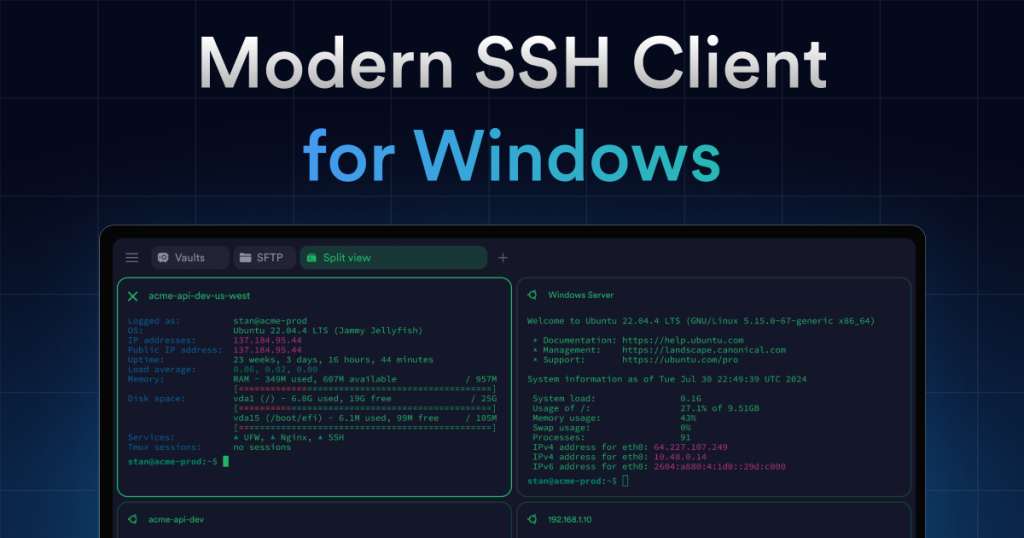
The official homepage still frames Termius as a Modern SSH Client for Mac, Windows, Linux, iOS, and Android. That matters because the product is clearly designed around continuity across devices. Readers who only need a single local terminal window may not need this at all, but readers managing many hosts and switching contexts often will immediately see why a more organized client can matter.

Annotated reference image based on the official Termius Windows download page highlighting the first-party installer route
The download page matters because a remote-access client should have an official Windows install path that feels direct and trustworthy.

The Windows download page is important because remote-access software should be installed from a clear first-party route. The current Termius download page still makes that path obvious. For software that may later store host records and credential-related data, the quality of the install route is part of the trust decision, not an afterthought.

Annotated reference image based on the official Termius install documentation highlighting the supported setup path
The install documentation matters because Termius should feel documented from the first setup step, not only after problems appear.

The installation docs strengthen that trust. The official documentation still explains how to download and install Termius across desktop and mobile devices, which matters because readers should not have to piece together setup from scattered posts. Good remote software should be documented from the first minute.

Annotated reference image based on the official Termius quick start guide highlighting the first-run path
The quick-start page matters because it turns Termius from a download into an understandable first-use workflow.

The quick-start guide is one of the best indicators of who the product is for. It still walks users from installation into account setup and the first host connection. That matters because a remote client should reduce uncertainty after install, not create a new puzzle. Termius looks strongest when it gives users a controlled path into real work.

Annotated reference image based on the official Termius connection guide highlighting multiple supported connection types
The connection guide matters because it shows Termius as a broader remote-access hub rather than only an SSH launcher.

The connection guide makes the scope of the product clearer. The official docs still list SSH, Mosh, Telnet, Serial, SFTP, and the Local Terminal. That shows Termius is not just a one-protocol shortcut. It is trying to become the place where a technical user manages a range of connection needs coherently.

Annotated reference image based on the official Termius SFTP guide highlighting file transfer and file management
The SFTP guide matters because Termius becomes more practical when terminal access and file access do not split into separate tools immediately.

The SFTP guide matters because remote work rarely stops at command execution. Files need to be uploaded, downloaded, and checked in context. The official Termius docs still explain SFTP browsing and transfer for desktop and mobile, which makes the product more useful for actual administration rather than only for isolated shell sessions.

Annotated reference image based on the official Termius tunneling guide highlighting local remote and dynamic forwarding
The tunneling guide matters because structured port forwarding is one of Termius’s strongest practical advantages for real remote work.

The port forwarding and tunneling guide adds even more practical value. The official docs still cover local, remote, and dynamic SSH forwarding. That matters because real remote work often involves secure access to internal dashboards, databases, and services rather than only command lines. A client that handles those routes clearly has much more daily value.

Annotated reference image based on the official Termius snippets guide highlighting repeatable command workflows
The snippets page matters because saved repeatable command workflows are part of what makes Termius more than a terminal launcher.

The snippets guide explains why Termius can stay useful after the first install week. The official docs still show how to create and run snippets, including across multiple hosts. That is important because repeatable command work is where remote tooling starts saving real time instead of only improving aesthetics.

Annotated reference image based on the official Termius SSH keys guide highlighting key and certificate management
The SSH keys page matters because remote-access software has to be judged partly on how it handles identity and credentials.

The SSH keys and certificates page is one of the most important trust signals on the site. The official guide still covers key handling inside Termius, including FIDO2 hardware keys and biometric keys. That matters because serious remote access should not be judged only on convenience; it should also be judged on how identity and credentials are handled.

Annotated reference image based on the official Termius security page highlighting encrypted vaults and centralized access control
The security page matters because Termius has to prove it can handle sensitive remote-access workflows responsibly.

The official security page completes the picture by highlighting encrypted vaults, centralized access control, and SOC 2 Type II certified protection. Whether or not every reader needs enterprise controls, this still matters because remote-access software sits close to sensitive infrastructure. Termius is easier to recommend when the product publicly addresses that responsibility.

Our grounded judgment is that Termius is strongest for people who want remote access to stay organized across hosts, files, tunnels, keys, and repeated tasks. It is weaker for readers who only need a simple local SSH command now and then. Judged on the official materials available on April 21, 2026, Termius still deserves to be recommended as a structured remote-operations client, not merely as a prettier terminal.


Setup / Usage Guide

Installation steps, usage guidance, and common notes are maintained here.

The best way to start with Termius is to treat it as a remote-access workspace that should reduce repeated connection friction, not as a replacement for understanding SSH itself. The official materials checked on April 21, 2026 make the path clear: install from the official Windows route, follow the quick-start guidance, add one real host carefully, test file access and tunneling only after a plain connection works, and think about keys and saved credentials deliberately instead of as an afterthought.

  1. Start from the official homepage at https://www.termius.com/ so you evaluate the product correctly. Termius is strongest when you need organized remote work, not only a one-off shell.
  2. Use the official download route at https://termius.com/download for Windows installation. Avoid third-party mirrors for software that may later store host and credential-related information.
  3. If anything about installation feels unclear, review the official install docs at https://docs.termius.com/getting-started/download-termius. The product already provides a first-party setup path, so there is no reason to guess.
  4. Open the official quick-start guide and follow the first-run order. It is useful because it connects installation, setup, and first host access into one sequence.
  5. Add only one host at first. Use a server you understand, confirm the hostname, port, and username carefully, and avoid importing a large host list before you trust your own structure.
  6. Test a plain connection before you configure extras. The official connection guide makes it clear that Termius supports multiple connection types, but your first goal should be a clean successful login.
  7. Decide early how you will handle credentials. If you use SSH keys, review the official key guide before storing them casually. Security discipline matters more once hosts accumulate.
  8. If your workflow includes file movement, open the official SFTP guide and test file browsing on a non-critical path first. This is one of the easiest ways to judge whether Termius can replace part of your current tool stack.
  9. If you need internal service access, review the official tunneling guide and set up port forwarding carefully. Misunderstood tunnels can expose or break access in ways that feel mysterious if you rush.
  10. Use snippets only after you know the commands are safe and repeatable. Saved command automation is powerful, but it should reduce routine work, not turn mistakes into reusable shortcuts.
  11. If you move between several servers or environments, create a naming system for hosts, groups, and tags before the list grows messy. Termius is strongest when organization improves over time instead of decaying.
  12. If you work across devices, decide intentionally whether secure sync is useful for you. Cross-device access is part of the product's value, but it should match your own security expectations.
  13. Review the official security page if you are using Termius in a team or infrastructure-sensitive environment. Vault behavior, access control, and compliance posture matter more once other people depend on the same setup.
  14. Keep the first week simple. Connect, browse files, try one tunnel, and maybe save one safe snippet. Do not turn the client into a complex control surface before the basics feel dependable.
  15. After a short trial, ask whether Termius is genuinely reducing remote-work friction. If it helps you manage hosts, files, tunnels, and keys with less confusion, keep it. If your needs remain tiny and local, a simpler tool may still fit better.

A practical Termius setup usually means downloading from the official Windows route, following the quick-start sequence instead of improvising, testing one host cleanly before scaling up, treating SFTP and port forwarding as deliberate workflow tools rather than random extras, managing SSH keys with intention, using snippets only for safe repeatable commands, and checking the security guidance before the product becomes part of serious infrastructure work. That is how Termius stays helpful instead of becoming one more remote-access layer to babysit.

Related Software

Keep exploring similar software and related tools.