Overview

This section highlights the core features, use cases, and supporting notes.

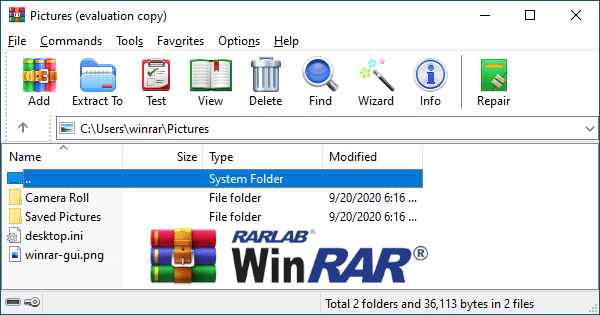
WinRAR is an archive manager for Windows users who need to open, create, and organize compressed files in everyday desktop work. It is especially useful for software packages, downloaded archives, shared file bundles, and long-lived Windows workflows that still rely heavily on RAR and ZIP formats. Its strength is familiarity and broad practical archive handling, though users should still pay close attention to extraction paths and current licensing terms on the official site.

WinRAR has remained part of Windows life for so long because compressed files never really stopped mattering. Software packages, grouped work files, archived documents, and shared downloads still arrive in formats that need a dependable archive tool, and WinRAR continues to be one of the best-known options for handling that job.

It is especially suitable for users who routinely extract downloads, package folders for transfer, or manage archives across office, personal, and technical workflows. If compressed files show up often enough that the built-in system tools feel limiting or inconsistent, WinRAR can provide a more established archive experience.

What makes it worth keeping is not novelty but reliability in a familiar task. Opening archives, creating compressed packages, and handling file bundles cleanly are the kinds of small daily actions that become more valuable when the tool stays predictable over time.

The tradeoff is that archive utilities can seem simple while still encouraging careless behavior. Extracting to the wrong path, overwriting files without checking, or assuming every archive is trustworthy creates more trouble than the tool itself. Users should also review current licensing and edition information directly on the official site instead of relying on old assumptions.

My recommendation is to use WinRAR if archive handling is a recurring part of your Windows workflow and you want a known, straightforward tool for that layer of file management. Keep an eye on extraction destinations, use clean archive naming, and let it remain a dependable utility rather than background clutter.


Setup / Usage Guide

Installation steps, usage guidance, and common notes are maintained here.

1. Open the official WinRAR website and download the current Windows version from there. Starting from the official source is the safest way to get the correct installer and see any current product or licensing information.

2. Install WinRAR and launch it once before assigning every archive format to it. This gives you space to understand the interface and test basic archive handling first.

3. Open a familiar ZIP or RAR file and review the file list before extracting. Even simple archives are easier to manage when you pause long enough to see what is inside and where it should go.

4. Choose an extraction path carefully instead of clicking through the default without checking it. Good archive habits start with putting files in the right place.

5. Create one small archive from a test folder so you understand how compression and output naming work. A useful archive tool should feel clear in both directions, not only when opening files from others.

6. Review overwrite prompts and folder structure during extraction, especially when unpacking software bundles or repeated versions of the same project. Archive mistakes often come from path confusion rather than software failure.

7. Decide selectively which archive formats WinRAR should handle by default. There is no need to claim every type if another part of your workflow is already stable.

8. If you exchange archives with other people often, test one real send-and-open cycle to make sure the format and folder structure are practical for the recipient.

9. Keep work archives organized with clear names and version context. WinRAR becomes more valuable when your file-handling habits are readable and deliberate.

10. Return to the official WinRAR site for updates and current product information. The tool is most useful when it stays tied to official releases and careful archive management habits.

Related Software

Keep exploring similar software and related tools.