Overview

This section highlights the core features, use cases, and supporting notes.

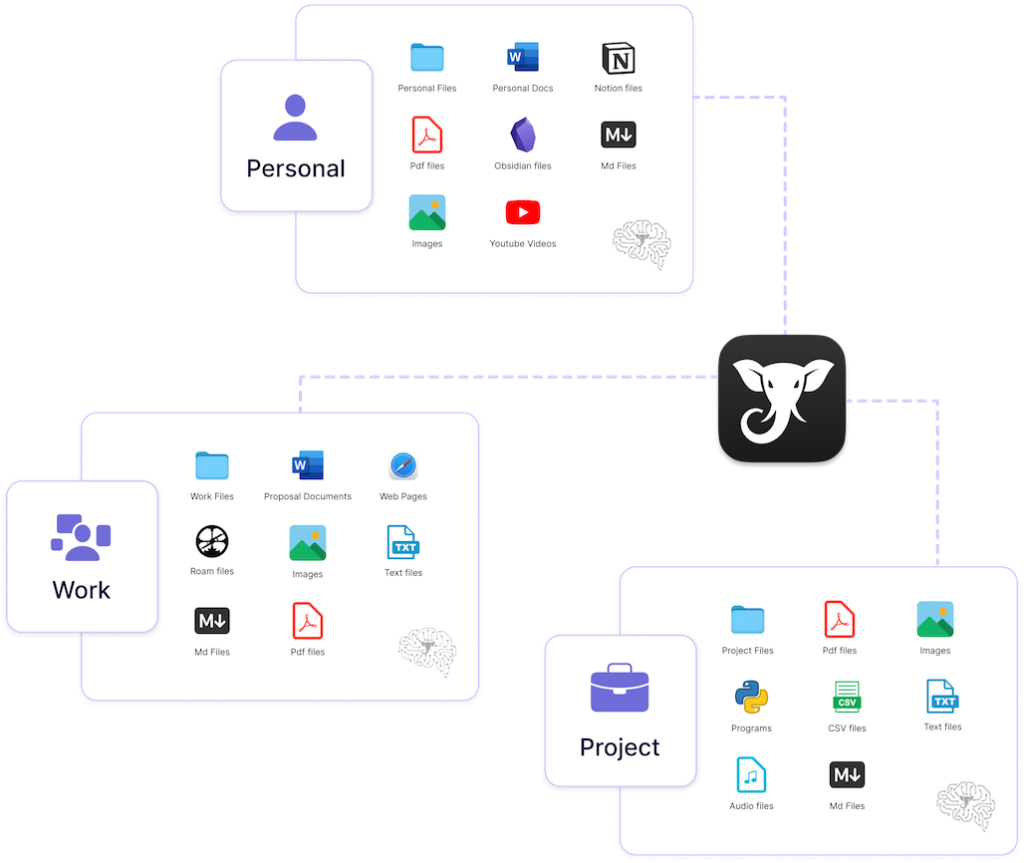
Elephas is most useful when it is judged as a private knowledge workspace for sensitive documents, notes, and writing instead of as a generic cloud chatbot. The official homepage, pricing page, iPhone and iPad page, demos page, about page, sensitive-data-protection page, privacy policy, terms of use, and official support articles on data storage and offline Ollama workflows checked on April 18, 2026 all point to a product built around privacy-sensitive knowledge work. That positioning matters because Elephas keeps making the same core claims across multiple official surfaces: redact personal information before processing, keep indexing local, choose how the AI runs, and extend the experience across Mac and iOS. The iOS page adds knowledge bases, 20 plus file formats, answers with citations, and a 7 day free trial. The demos page frames the product as personal ChatGPT from your own documents and notes, while the support site goes further by explaining data storage questions and a fully offline Ollama path. What keeps Elephas worth considering is the consistency of that privacy and knowledge-work story. The sensitive data page explicitly calls out local-first indexing and redaction for legal, medical, policy, and executive workflows. The pricing page makes privacy control part of the plan structure rather than a hidden detail. The support and policy pages also help because a product like this only deserves real work material when trust surfaces are visible beyond the homepage. Our grounded judgment is that Elephas is strongest for Mac and iOS users who work with private notes, documents, research, and knowledge bases and want more control over local indexing, redaction, and even offline AI operation. It is weaker for Windows-first users, people who only need a public-cloud writing toy, or anyone who does not actually need a privacy-focused knowledge layer. Elephas looks most defensible when sensitive knowledge work is the real problem being solved.

The current English page for Elephas is still too thin for what Elephas’ own materials now show. The official homepage checked on April 18, 2026 does not frame the product as just another AI writer. It frames Elephas as AI for Sensitive Documents & Writing and a Private Knowledge Workspace. That matters because the right way to judge Elephas is by privacy-sensitive document work, note indexing, and knowledge workflows rather than by ordinary generic chat behavior.

Annotated reference image based on the official Elephas homepage highlighting sensitive documents writing and local control
The homepage matters because Elephas is trying to be a private knowledge workspace, not just another generic AI writing app.

The same homepage description keeps the product grounded in concrete trust language. Elephas says users can redact personal information before processing, keep indexing local, and choose how your AI runs. It also says the product is for Mac and iOS. That matters because platform fit and privacy posture are both part of the real decision. Elephas is not pretending to be for everyone on every device.

The official Pricing page reinforces that privacy is built into the product structure rather than added later. Elephas says every plan protects sensitive data by default and that higher plans provide more visibility and control over redaction. That matters because a tool aimed at private knowledge work should not hide its trust model behind only marketing slogans. Plan shape becomes part of whether the software actually fits a serious workflow.

Annotated reference image based on the official Elephas pricing page highlighting sensitive data protection and redaction control
The pricing page matters because Elephas is selling workflow trust and control, not only message volume.

The iPhone & iPad page expands the product beyond one desktop surface. Elephas says users can turn files, notes, and research into an AI they can talk to, create knowledge bases, add 20+ file formats, and get instant answers with citations. The page also mentions a 7 day free trial. That matters because a knowledge assistant becomes more compelling when it can travel with the user’s documents and notes instead of staying trapped in one desktop context.

Annotated reference image based on the official Elephas iPhone and iPad page highlighting knowledge bases file formats and citations
The iOS page matters because Elephas is also trying to be a mobile knowledge layer, not only a desktop sidebar.

The official Demos page makes the product easier to judge. Elephas describes itself there as your ideas, your files, your AI, fully Mac-native, and calls it personal ChatGPT from your own documents and notes. That matters because knowledge assistants often sound interchangeable until users can see the kinds of workflows they are meant to support. Demos are part of whether the product feels like a real tool instead of an abstract privacy claim.

Annotated reference image based on the official Elephas demos page highlighting Mac native knowledge workflows
The demos page matters because Elephas is best judged through real knowledge workflows, not only broad feature slogans.

The About page clarifies who Elephas is actually for. It says Elephas is an AI knowledge assistant built for knowledge workers and that the company has been building the future of personal AI since 2021. That matters because the product is not being positioned as a casual consumer novelty app. It is trying to serve people whose daily work depends on documents, notes, research, and information recall.

Annotated reference image based on the official Elephas about page highlighting knowledge workers and product direction since 2021
The about page matters because Elephas is clearly trying to serve knowledge workers, not only casual chat users.

The Sensitive Data Protection page is one of the strongest reasons to take the product seriously. Elephas says it uses local-first indexing and redaction before processing, and it explicitly names legal, medical, policy, and executive workflows. That matters because privacy language is far more credible when a product names the kinds of higher-trust work it is trying to protect instead of gesturing vaguely at security.

Annotated reference image based on the official Elephas sensitive data protection page highlighting local first indexing and redaction
The sensitive data page matters because Elephas keeps making trust and redaction central to the product story.

The official Privacy Policy and Terms of Use also matter here. Elephas exposes both under its main product domain, and that matters because a service that may index private notes and client material should not ask users to trust only a homepage. Visible policy and terms surfaces are part of whether the product deserves actual work data.

Annotated reference image based on the official Elephas privacy policy page highlighting data and privacy handling visibility
The privacy page matters because knowledge tools only earn trust when data handling is visible and explicit.
Annotated reference image based on the official Elephas terms of use page highlighting formal service conditions
The terms page matters because a long-term knowledge workspace should expose formal conditions clearly, not only pricing and features.

The official support site adds another layer of credibility. The support article on data storage and privacy says it covers common questions about Elephas Super Brain privacy policy. That matters because real user trust questions usually surface in help docs, not only in headline copy. Elephas having a dedicated knowledge-base explanation for those concerns makes the privacy story feel more operational.

Annotated reference image based on the official Elephas support article about data storage and privacy
The support privacy page matters because real trust questions usually show up in help docs, not only on the homepage.

The support article on running Elephas offline with Ollama may be the clearest advanced differentiator of all. Elephas says the guide covers running the knowledge assistant 100 percent offline with Ollama. That matters because offline operation is one of the most concrete ways a privacy-focused knowledge workspace can separate itself from default cloud-only tools. It also gives advanced users a more credible path to keep especially sensitive work under tighter control.

Annotated reference image based on the official Elephas support article about running offline with Ollama
The offline guide matters because local AI is one of the clearest reasons a privacy-focused knowledge tool might deserve a place in a serious workflow.

Our grounded judgment is that Elephas is most worth keeping for Mac and iOS users who work with private notes, research, documents, and knowledge bases and want stronger control over local indexing, redaction, and even offline AI operation. It is a weaker fit for Windows-first users or for people who only want a casual public-cloud writing tool. Elephas looks strongest when the real problem is sensitive knowledge work, because that is where its official product surfaces stay most coherent.

Setup / Usage Guide

Installation steps, usage guidance, and common notes are maintained here.

The best way to start with Elephas is to treat it as a privacy-focused knowledge workspace instead of as a generic AI chat app. Elephas' official pages and support materials checked on April 18, 2026 show a clear first-use path: confirm the platform fit, understand how privacy and redaction work, create one small knowledge base from real files or notes, then only expand into deeper workflows like mobile use or offline Ollama once the core document workflow already makes sense.

  1. Start from the official homepage at https://elephas.app/. That keeps the evaluation inside Elephas' own privacy, pricing, and support chain.
  2. Confirm platform fit before anything else. Elephas explicitly presents itself as a Mac and iOS product, so Windows-first users should lower expectations early.
  3. Read the official Sensitive Data Protection page and the Privacy Policy before importing real work files. Elephas is strongest when privacy-sensitive knowledge handling is part of the reason you are considering it.
  4. Check the Pricing page before building a large workflow. Elephas ties plan choice to sensitive-work protections and redaction visibility, so it is better to understand the model up front.
  5. Use the official demos page to understand what a good Elephas workflow is supposed to look like. This is especially helpful if the idea of a private knowledge assistant still feels abstract.
  6. Start with one small real knowledge base rather than importing everything at once. A narrow set of notes, PDFs, research files, or project documents makes it easier to judge answer quality and citations honestly.
  7. Test how Elephas handles one real question you would normally need to search across notes or files to answer. That is a better evaluation than asking it generic novelty prompts.
  8. Pay close attention to citations, file coverage, and whether the answers stay grounded in your own material. A knowledge assistant only becomes worth keeping when retrieval stays useful and trustworthy.
  9. If you also work from mobile, check the official iPhone & iPad page and then test whether the iOS workflow actually helps you capture or retrieve information away from the Mac.
  10. Use the official support article on data storage and privacy when you need more concrete answers than the landing pages provide. That is the right place to resolve practical trust questions.
  11. If privacy needs are especially strict, read the official guide on running Elephas offline with Ollama. Offline operation is more advanced, but it is one of the clearest reasons a tool like Elephas might deserve a place in sensitive workflows.
  12. Finish the trial with one practical question: does Elephas genuinely make it easier to work with your own private files and notes, or would a simpler note search or ordinary AI app already cover what you need?

A practical Elephas setup usually means starting from the official homepage, privacy pages, and demos, testing one small knowledge base on Mac first, then adding mobile use or an offline Ollama path only after the core retrieval workflow proves useful. That order gives Elephas the fairest evaluation and keeps the product grounded in the privacy-sensitive knowledge work it is actually built to support.

Related Software

Keep exploring similar software and related tools.