Overview

This section highlights the core features, use cases, and supporting notes.

Jenni AI is an AI writing and research assistant for students, researchers, and academic writers who need help drafting, citing, editing, and working from source material without leaving the writing flow. Its strongest value is that it stays close to research writing tasks like in-text citations, file-grounded drafting, and citation traceability.

Jenni AI makes the most sense when we judge it as a research-writing assistant, not as another broad AI writer. On April 14, 2026, the official site positioned Jenni AI around writing, citing, editing, agentic chat, file-grounded generation, traceable citations, and practical workflow support for millions of writers. That matters because academic writers and serious long-form users often do not need the flashiest chatbot. They need help staying in flow while keeping citations, sources, and drafts manageable.

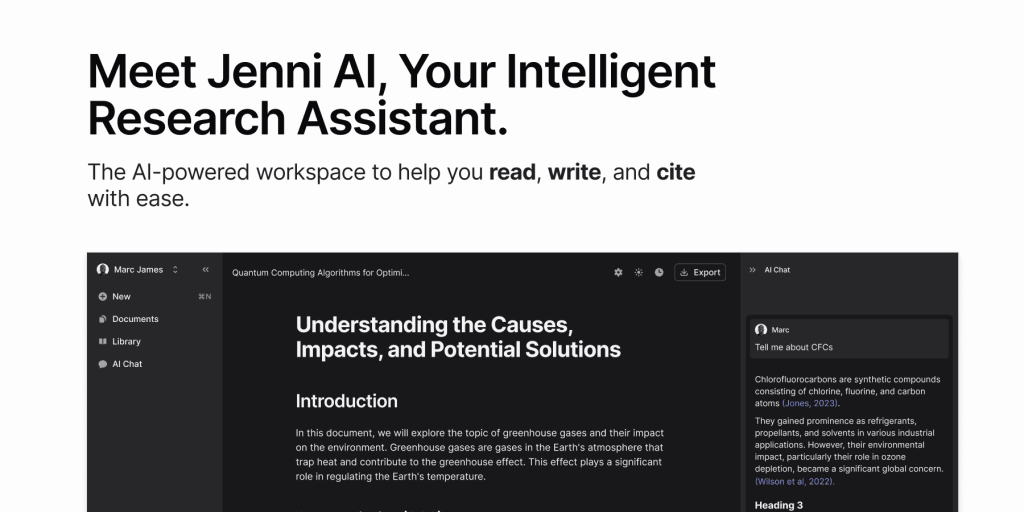
Annotated screenshot of the official Jenni AI homepage hero
The homepage hero matters because Jenni AI clearly frames itself as an intelligent research assistant, not just a generic AI copy tool.

The Write, cite, and edit positioning is one of the clearest reasons Jenni AI can be useful. Instead of separating drafting, citation work, and revision into different tools, the official site presents these as one connected workflow. That is especially relevant for users who lose time bouncing between a writing app, a citation manager, and a general chatbot.

Annotated screenshot of the official Jenni AI write cite and edit section
This workflow framing matters because research writing usually slows down at the handoff points between drafting, citing, and revising.

The in-text citation feature is one of Jenni AI’s most practical public signals. Citation handling is not a side feature in academic writing; it is part of the writing itself. Publicly highlighting in-text citations makes Jenni AI more relevant for students and researchers than AI tools that only help generate fluent paragraphs but leave citation work messy and disconnected.

Annotated screenshot of the official Jenni AI in-text citations section
In-text citation support matters because academic writing tools become far more practical when citation work stays close to the draft itself.

AI autocomplete is another useful signal, but it needs to be interpreted carefully. Good autocomplete can help a writer maintain momentum, especially when the structure is already clear. The risk is that users may accept smooth wording too quickly. Jenni AI looks strongest here when the user already knows the argument and uses autocomplete for drafting speed rather than intellectual substitution.

Annotated screenshot of the official Jenni AI autocomplete section
Autocomplete matters because writing flow is valuable, but it only helps when the writer stays in control of the actual argument.

The Agentic AI Chat section suggests Jenni AI is trying to support more iterative research work than sentence-level editing alone. This matters because many research writing problems involve back-and-forth clarification, source questions, and idea development. Used well, this can make Jenni AI more useful than a static editor that only rewrites text after the fact.

Annotated screenshot of the official Jenni AI agentic AI chat section
Agentic chat matters because research writing often needs iterative thinking and clarification, not only polished sentence output.

The file-grounded generation feature is another strong practical detail. Real academic work rarely begins from nothing. It often starts from papers, notes, transcripts, or old drafts. Publicly highlighting Generate From Your Files makes Jenni AI more convincing for users who want writing assistance grounded in their own material rather than in purely open-ended prompts.

Annotated screenshot of the official Jenni AI generate from your files section
File-grounded generation matters because serious writing usually depends on existing sources, notes, and drafts rather than empty prompts.

The phrase Traceable citations, every time is one of the most important trust signals on the homepage. In research writing, it is not enough for a tool to sound confident. Users need to see where claims are anchored. This makes Jenni AI more promising for serious academic use than assistants that generate plausible text without keeping source relationships visible.

Annotated screenshot of the official Jenni AI traceable citations section
Traceable citations matter because serious research writing depends on inspectable source links, not just polished wording.

The pricing page also helps keep the evaluation grounded. Writing assistants can feel lightweight until a user depends on them for repeated drafting, editing, and source-heavy work. Public pricing details help users decide whether Jenni AI fits occasional academic help, frequent writing support, or a more continuous professional workflow.

Annotated screenshot of the official Jenni AI pricing page
Pricing matters because serious writing workflows can quickly turn a casual helper into a real recurring tool decision.

Our grounded judgment is that Jenni AI is most worth trying for students, researchers, and long-form writers who want help drafting with citations, working from source files, and keeping research writing momentum without fully giving up control. It is less suitable for users who only want a generic chatbot or who expect AI writing to replace actual source evaluation and academic responsibility. Jenni AI looks strongest when the real need is writing support that stays close to citations and source material.

Setup / Usage Guide

Installation steps, usage guidance, and common notes are maintained here.

The safest way to start with Jenni AI is to treat it as a writing and citation assistant that helps your workflow, not as an automatic author that should decide what your paper or argument means.

  1. Open the official website at https://jenni.ai/ and read the workflow overview first. Jenni AI is easier to judge when you understand that it is trying to connect drafting, citing, editing, and file-based generation into one flow.
  2. If you want to begin actual use, the clearest official start path during this run is https://app.jenni.ai/register. This is the direct official entry for account creation and getting into the writing workspace.
  3. Start with one real writing task: a paper section, proposal, literature review, essay, or report. Jenni AI is easier to evaluate on work with a clear writing purpose than on empty demonstration prompts.
  4. Use the writing workspace first for structure and momentum, not for blind trust. AI autocomplete is most useful when you already know the point you want to make and need help keeping the draft moving.
  5. Turn to in-text citation support early if citation work is part of the task. This is one of Jenni AI's strongest practical public features, and it is better to build citation habits into the draft than to patch them in at the end.
  6. If you already have notes, source extracts, or draft material, test the file-based generation flow. This is a better real-world evaluation than asking the tool to write from nothing, because serious writing usually depends on source material you already collected.
  7. Use agentic chat for clarification and iteration, not as a substitute for checking the research itself. The tool can help you think through wording and structure, but you still need to verify the evidence and make the actual judgment calls.
  8. Pay close attention to traceable citations. If the citation chain feels unclear, fix that early. A polished paragraph is not useful in academic work if you cannot clearly inspect where the supporting evidence came from.
  9. Keep revision discipline. Even when Jenni AI speeds up drafting, re-read your text for factual precision, argument quality, and whether the wording still reflects what the cited source actually says.
  10. Check pricing before you commit to heavier use. A writing assistant that feels lightweight for one assignment may become a meaningful cost decision if it becomes part of daily academic or professional writing.
  11. Do not let speed remove scrutiny. The practical question is whether Jenni AI helps you write with better flow and citation support while still keeping the final responsibility with you.
  12. After one full draft section or one realistic assignment, decide based on one question: does Jenni AI improve your writing workflow without weakening your control over evidence, citations, and final claims?

A practical Jenni AI workflow usually starts with one real draft, adds citation support early, uses file-grounded assistance when possible, and keeps the writer responsible for checking sources, wording, and argument quality at every stage.

Related Software

Keep exploring similar software and related tools.