Overview

This section highlights the core features, use cases, and supporting notes.

OpenShot is a free open-source video editor for Windows users who want to cut clips, add music, place titles, and export a clean video without learning a heavyweight post-production suite first. It fits simple YouTube edits, tutorial videos, class projects, product demos, and other timeline-based work where clarity matters more than studio-level complexity.

Its real value is approachability with enough depth to stay useful: multiple tracks, transitions, keyframe animation, and practical export options are all available in one place. The main tradeoff is that very large or effect-heavy projects can push past its comfort zone faster than they would in more advanced commercial editors.

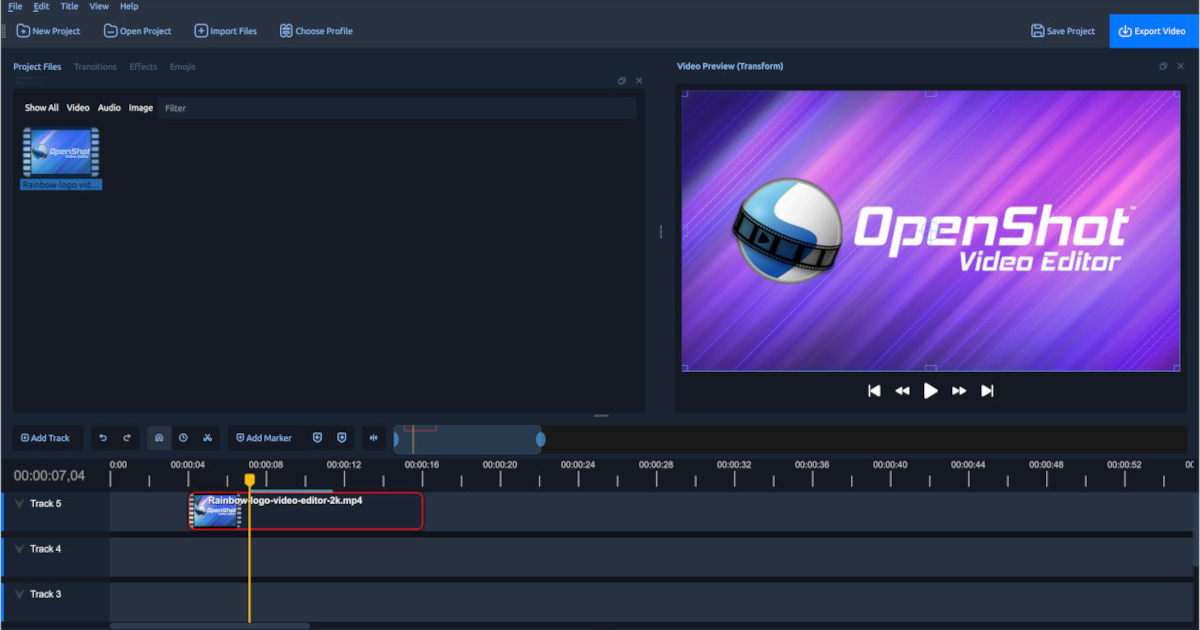
OpenShot is best understood as an entry-friendly non-linear video editor rather than a toy clip trimmer. You can import video, audio, and image files, arrange them on a timeline, cut scenes, add transitions, insert titles, and render a final file for sharing. For anyone looking for a free Windows video editor for tutorials, classroom work, lightweight social clips, or internal business videos, that already covers a lot of real tasks.

What keeps OpenShot worth installing is that it does not stop at basic trimming. It gives you layered tracks, keyframe-based motion, title tools, waveform-aware audio work, and flexible export settings without hiding everything behind an overbuilt interface. If you are learning how timeline editing works, it is much easier to read than many professional editors.

The right audience is the person who wants to finish videos consistently, not the person who needs the most advanced editing environment on day one. If your routine involves slide-and-voice videos, talking-head edits, software walkthroughs, simple marketing clips, or family video cleanups, OpenShot can be a practical long-term tool instead of just a temporary beginner app.

The limitation is project scale and expectations. OpenShot is not the strongest choice when you regularly handle dense 4K timelines, demanding motion graphics, or complex collaborative post workflows. Aidown’s judgment is that OpenShot is worth recommending when you want a free Windows video editor that remains understandable, honest about its scope, and capable enough for everyday publishing work.


Setup / Usage Guide

Installation steps, usage guidance, and common notes are maintained here.

1. Go to the official OpenShot website and use the Windows download entry instead of mirror packs or third-party software portals.
2. Install the standard Windows package, then launch OpenShot once so it can finish first-run setup and create its local folders.
3. Before editing, create a dedicated project folder on a local drive and place your video clips, audio, subtitles, and logo files there. This reduces missing-file issues later.
4. Start a new project and check that the project profile roughly matches your footage or target export size. Getting this right early makes preview and export behavior more predictable.
5. Import your media into the project files panel first, then drag clips onto the timeline. Use separate tracks for main footage, music, overlays, and titles so the timeline stays readable.
6. Trim clips by dragging their edges, split where needed, and keep transitions selective. For many tutorial or commentary videos, clean cuts often look better than effect-heavy edits.
7. Add titles, captions, or simple motion after the core sequence is stable. If preview playback feels rough, do not judge final export quality only from the live preview window.
8. Export a short test segment before rendering the entire project. This helps catch subtitle timing, frame rate mismatches, and audio balance problems early.
9. Save the project file inside the same project folder and keep the source media in place. If you move assets later, OpenShot may require manual relinking.
10. Keep future updates tied to the official OpenShot site, especially if you depend on a repeatable export workflow for recurring content.

Related Software

Keep exploring similar software and related tools.