Overview

This section highlights the core features, use cases, and supporting notes.

Plandex is an open-source terminal AI coding agent built for large projects, large files, and longer multi-step development work rather than for quick one-file demos. It is most useful for developers who are comfortable in a CLI workflow and can run it in Linux, macOS, or Windows via WSL, while the main caution in 2026 is that Plandex Cloud has been winding down since October 3, 2025, so new evaluations should be planned around local or self-hosted use instead of cloud signup.

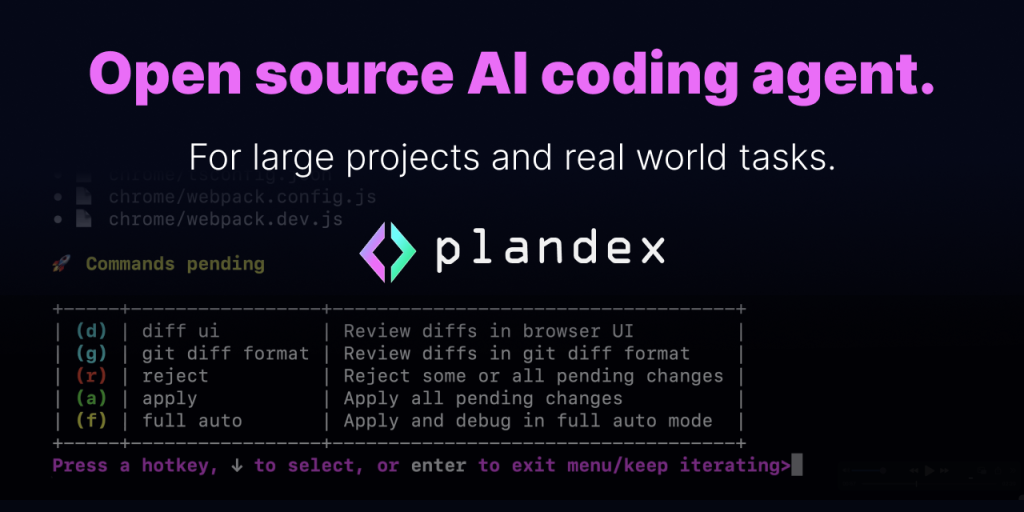
Plandex is worth describing carefully because the current official sources tell a more nuanced story than its older software-directory summaries do. On April 16, 2026, the official homepage still presented Plandex as an open-source, terminal-based AI coding agent designed to handle large projects, large files, and large tasks. That is the right starting frame. Plandex is not trying to be a lightweight desktop chat window for code snippets. It is aimed at developers who want a more durable workflow for larger engineering tasks.

Annotated reference image based on the official Plandex homepage showing its open-source terminal AI coding agent positioning for large tasks
The homepage positioning matters because it makes Plandex’s intended fit clear: larger terminal-driven coding work instead of casual GUI-first assistance.

The public feature set reinforces that positioning. The homepage highlights a diff review sandbox, full auto mode, and smart context management up to 2M tokens. Those claims matter because they show what Plandex thinks its edge is: not novelty, but staying useful when the task expands across more files and more iterations. Our grounded judgment is that Plandex becomes interesting when a coding problem has already outgrown simple prompt-and-paste routines.

Annotated reference image based on the official Plandex homepage showing the diff review sandbox full auto mode and 2M token context claims
These feature claims matter because Plandex has to justify itself on larger coding tasks, not just on tiny completions.

Plandex also remains easier to describe honestly because the official homepage is open about its model-provider strategy. It says Plandex mixes models from Anthropic, OpenAI, Google, and more. That does not automatically make the tool better, but it does make its role clearer. Plandex is not only a single-model shell wrapper. It is trying to be a coding workflow layer that can orchestrate different models across planning, editing, and debugging stages.

Annotated reference image based on the official Plandex homepage showing its multi-provider model strategy across Anthropic OpenAI and Google
The model strategy matters because Plandex is positioning itself as a workflow layer rather than as a one-model coding chat.

The install story is also more concrete than the current aidown page suggests. The official install docs list a quick-install shell command, a manual path using platform binaries from the latest release, and a build-from-source path. That is exactly the kind of install documentation we want on a terminal-first product page: simple enough for quick trials, but not locked into one opaque installer.

Annotated reference image based on the official Plandex install docs showing quick install manual binary install and build from source
The install docs matter because Plandex is a CLI tool, so setup clarity is part of the real product value.

Windows users need one especially important correction before they install anything. Both the install docs and the quickstart say Windows is supported via WSL, and they explicitly say Plandex only works correctly in the WSL shell, not in Windows CMD or PowerShell. This is not a minor footnote. It changes who should use the tool. If someone wants a native Windows coding assistant with no Linux layer, Plandex is probably the wrong fit.

Annotated reference image based on the official Plandex quickstart showing Windows support via WSL only
The WSL note matters because it prevents users from trying Plandex in the wrong Windows shell and misjudging the tool.

The most important current-state change, though, is not the CLI itself but the hosting model. The official quickstart now says Plandex Cloud is winding down as of October 3, 2025 and is no longer accepting new users. On the same page, the docs direct users toward self-hosted or local mode instead, with Docker or their own server and their own model-provider API keys. That means the practical onboarding story in 2026 is very different from what an older cloud-first description would imply.

Annotated reference image based on the official Plandex quickstart showing cloud winding down and self hosted local mode for new users
The quickstart matters because it shows the real 2026 recommendation path: local or self-hosted usage, not fresh cloud signup.

The local-mode guidance is still meaningful on its own. The quickstart says you can run Plandex locally with Docker or host it on your own server, and it describes a bring-your-own-key model using OpenRouter.ai or other provider accounts and API keys. That keeps Plandex genuinely usable for developers who want the open-source workflow after cloud onboarding stopped. So while the company story changed, the tool itself still has an evaluable path.

Annotated reference image based on the official Plandex quickstart showing local mode with Docker and bring your own model provider keys
Local mode matters because the open-source project still has evaluation value even after cloud signup stopped.

The official cloud docs confirm the same direction. They still exist, but now the very first thing they say is that Plandex Cloud is winding down as of October 3, 2025 and no longer accepting new users. That is why this English page should not pretend the old cloud path is still the main recommendation. The official docs themselves now warn against that assumption.

Annotated reference image based on the official Plandex cloud docs showing the winding down notice and no new users warning
The cloud-status docs matter because they keep the page from sending readers into an outdated signup flow.

The official blog post from October 3, 2025 explains the reason. The founder wrote that he had accepted an engineering position at Promptfoo and made the decision to wind down Plandex as a company and cloud service, while keeping the open-source project available on GitHub. The same post said existing cloud customers could continue operating until November 7, 2025. From that source, our grounded inference on April 16, 2026 is that Plandex Cloud should now be treated as historical context rather than as an active new-user route.

Annotated reference image based on the official Plandex winding down post showing that the cloud service is ending while the open source project remains on GitHub
This founder update matters because it explains what changed, what stayed open source, and why the page should now focus on local or self-hosted use.

The GitHub release feed gives one more useful grounding point. On April 16, 2026, the latest official release endpoint for plandex-ai/plandex returned cli/v2.2.1, published on July 16, 2025. That is helpful because it gives users one authoritative upstream version checkpoint before they invest setup time. It also matches the terminal-first positioning better than a generic app-store expectation would.

Annotated reference image based on the official Plandex GitHub release page showing cli v2.2.1 published on July 16 2025
The release page matters because it gives new evaluators a clean upstream version checkpoint before they spend time installing Plandex.

Our grounded judgment is that Plandex is still worth evaluating for developers who want an open-source terminal coding agent for larger tasks and are comfortable with WSL, Linux, macOS, Docker, or self-hosted setup. It is less suitable for users who want a polished native Windows coding app, a low-friction cloud onboarding path, or a tool that hides most infrastructure choices. In 2026, the honest Plandex recommendation is open-source workflow first, cloud convenience second, because the official sources say that is where the product now stands.


Setup / Usage Guide

Installation steps, usage guidance, and common notes are maintained here.

The best way to start with Plandex now is to evaluate it as an open-source terminal coding workflow for larger tasks, not as a turnkey cloud coding service. The official docs and the official October 3, 2025 wind-down note make that clear, so a clean setup means deciding early whether you are comfortable with WSL, Docker, and bring-your-own model-provider keys.

  1. Open the official homepage at https://plandex.ai/ first so you understand the intended product shape. Plandex explicitly describes itself as a terminal-based coding agent for large projects, large files, and large tasks.
  2. Before installing, open the quickstart at https://docs.plandex.ai/quick-start and the install docs at https://docs.plandex.ai/install. This matters because the setup reality in 2026 is different from an older cloud-first impression.
  3. If you are on Windows, stop here and verify that you are willing to use WSL. The official docs say Windows is supported via WSL and that Plandex does not work correctly in CMD or PowerShell. If you want a native Windows-only experience, this is the point to choose a different tool.
  4. Use the install method that matches your comfort level. The docs list a quick shell-install command, a manual binary path from the latest release, and a build-from-source path.
  5. Do not plan around a fresh Plandex Cloud signup. The official quickstart and cloud docs say Plandex Cloud has been winding down since October 3, 2025 and is no longer accepting new users.
  6. For a real evaluation, follow the self-hosted or local-mode path instead. The quickstart says you can run Plandex locally with Docker or host it on your own server and use your own model-provider accounts and API keys.
  7. If you want the quickest supported model path, the quickstart points to OpenRouter.ai as the fastest bring-your-own-key option, while also noting that other providers are possible. Decide your provider strategy before expecting smooth first use.
  8. Start with one repository task that is genuinely too large for a simple one-shot coding prompt. Plandex's official positioning is all about larger tasks, so a tiny example will not tell you much.
  9. Use the review-oriented parts of the workflow deliberately. The homepage highlights a diff review sandbox and staged changes, so do not skip the point where Plandex is supposed to help you inspect broader edits before they land.
  10. If your task spans many files or several rounds of iteration, pay attention to whether Plandex actually keeps context coherent. That is one of the main promises behind the large-project and 2M-token positioning.
  11. When you need to confirm the current upstream version, use the official GitHub release page. On April 16, 2026, the latest release endpoint returned cli/v2.2.1 published on July 16, 2025.
  12. After a few real sessions, judge Plandex with one practical question: is it helping you manage larger terminal-first coding work with better continuity and reviewability, or is the setup burden too high for the value it returns?
  13. If the tool helps on bigger tasks and you are comfortable with WSL or self-hosted setup, keep it in your workflow. If you mainly wanted effortless cloud onboarding or a native Windows coding assistant, move on quickly rather than forcing a mismatch.

A practical Plandex evaluation in 2026 usually means reading the official quickstart first, accepting the WSL-only rule on Windows, installing through the documented CLI path, using local or self-hosted mode instead of relying on new cloud access, choosing a model-provider key strategy up front, and then testing the tool on one real multi-file task where staged review and long-context handling actually matter.

Related Software

Keep exploring similar software and related tools.