Overview

This section highlights the core features, use cases, and supporting notes.

Research Rabbit is more useful as a visual literature discovery and tracking workspace than as a generic academic search box. Users looking for an AI literature review tool, research paper discovery graph, or a visual workflow for finding related papers will get the most value when they already have one or two relevant seed papers and need to expand outward, organize promising work, and keep a topic alive over time. It is especially practical for graduate students, researchers, and long-running review projects, but it should support critical reading and reproducible research workflow, not replace them.

Research Rabbit works best when you understand that it is not trying to be just another academic keyword search page. The official site frames it as a faster, smarter way to handle literature reviews, but the stronger insight is that it turns discovery into an ongoing visual workflow. Instead of collecting isolated PDFs and flat result lists, you start with a direction, expand from there, and keep the topic alive as connections appear. For users searching for an AI literature review tool or a visual way to find related papers, that difference matters more than the AI label itself.


Annotated screenshot of the official Research Rabbit homepage showing the follow your curiosity positioning
The homepage is worth showing because it clarifies the product’s tone and boundary right away: Research Rabbit is built for exploratory literature review and connected discovery, not just one more search results page. Click the image to open the full-size screenshot.

The official features page gives the most practical clue about how to use it well: search with direction. In plain terms, Research Rabbit becomes far more useful when you begin with one good seed paper, a known author, or a small trusted starting set instead of trying to brute-force a vague topic from zero. That makes it a good fit for dissertation prep, grant background reading, scoping a new subfield, or expanding a bibliography after you have already found one solid anchor paper. It is less convincing if you expect the tool to replace foundational database searching from scratch.


Annotated screenshot of the official Research Rabbit features page showing the search with direction section
This section has real value because it points to the right mental model: Research Rabbit works best when you start from a meaningful seed and expand outward instead of treating it like a generic web search box. Click the image to open the full-size screenshot.

Where Research Rabbit starts to feel genuinely different is organization. The feature page is explicit that the workflow should stay organized as you go, which is a bigger deal than it sounds. Literature review often breaks down after discovery, not during it. People find papers, open too many tabs, forget why something mattered, and lose track of which branch belongs to which question. Research Rabbit is most useful when it keeps collections, reading directions, and topic branches from collapsing into that kind of clutter. That makes it especially practical for multi-week or multi-month projects rather than one-night searches.


Annotated screenshot of the official Research Rabbit features page showing the organization-focused workflow section
The organization screenshot matters because it reflects the real pain point for many researchers: staying coherent after discovery. A tool that helps keep topic branches and paper groups readable can be worth more than one that only returns more papers. Click the image to open the full-size screenshot.

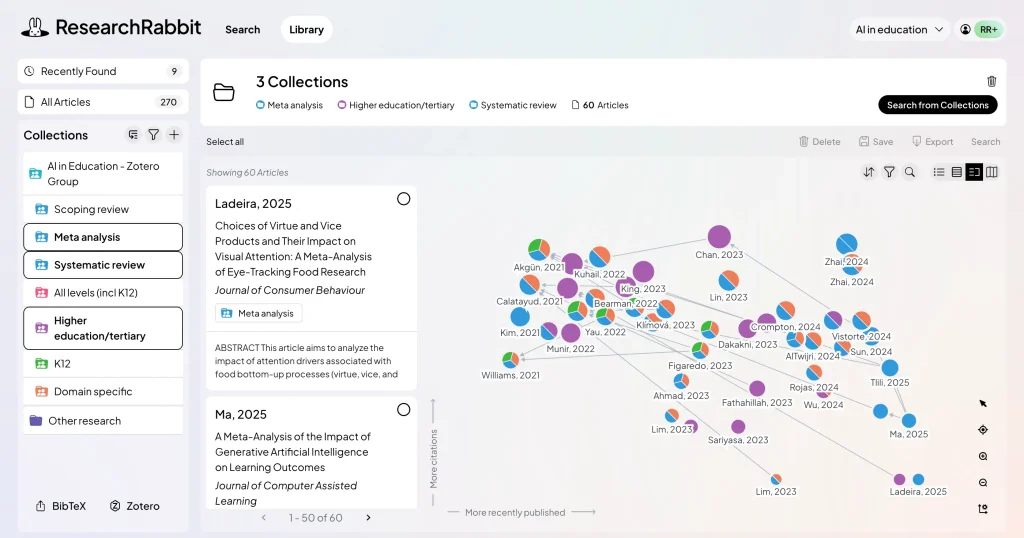
The most distinctive part of Research Rabbit is still the connection view. The official site emphasizes visual links between papers, authors, and concepts, and that is where the product earns attention. A research paper discovery graph is useful not because it looks impressive, but because it helps you notice clusters, missing branches, influential authors, and how ideas move over time. This is especially helpful when you are trying to understand the shape of a field rather than only collect citations one by one.


Annotated screenshot of the official Research Rabbit features page showing the discover connections section and visual graph
This is one of the most valuable screenshots because it shows what makes Research Rabbit different from flat search results: the chance to see patterns and relationships instead of only scanning another long list. Click the image to open the full-size screenshot.

There is also a practical maintenance signal that many academic tools lack: the official help area is not empty. The guide pages cover getting started, search, author exploration, and how the search algorithm works. That matters because tools like this can look intuitive in a demo but still need a bit of workflow learning before they save real time. For readers trying to decide whether the platform can support daily use, a maintained guide section is more useful than a polished landing page alone.


Annotated screenshot of the official Research Rabbit guide page showing search and author exploration help topics
The guide page deserves a place in the article because it gives users an immediate next step after signup: how to search properly, how to explore authors, and where to learn the logic behind the recommendation flow. Click the image to open the full-size screenshot.

Our judgment is that Research Rabbit is strongest as an exploration-first tool for visual literature review, topic expansion, and long-term research tracking. It is weaker when users expect strict reproducibility by itself. For systematic reviews, protocol-bound searches, or other highly auditable workflows, it should support a broader method rather than replace controlled database searching and manual record keeping. Used with that expectation, it becomes much easier to recommend: not a magic answer engine, but a very practical workspace for finding, grouping, and revisiting research more intelligently.

Setup / Usage Guide

Installation steps, usage guidance, and common notes are maintained here.

The best way to evaluate Research Rabbit is to use it on one real research question, not to click around the graph view for five minutes and guess what it can do. The steps below keep the trial practical and aligned with the official feature and guide pages.

  1. Open the official Research Rabbit site from the website button on this page and create an account. Before searching anything, decide the real topic you want to investigate so the first collection has a clear purpose.
  2. Start with one or two solid seed papers, not only a vague keyword. A strong review article, a foundational paper, or one recent paper you already trust usually gives better results than broad topic terms on their own.
  3. Create a collection for that exact question or project. If you are working on multiple subtopics, keep separate collections instead of throwing everything into one place from the start.
  4. Use the search and expansion flow to add related papers gradually. Do not save everything at once. The goal is to build a useful network around your question, not a larger unread pile.
  5. Explore outward by author and citation relationships when the topic starts to branch. This is one of the areas where Research Rabbit can save time because it helps you see influential contributors and follow ideas across neighboring papers.
  6. Pause early and prune noise. Remove papers that are only loosely related, duplicate what you already have, or lead you into attractive but irrelevant side paths. Visual discovery tools become much more useful when you keep the graph honest.
  7. Use the connection view to look for clusters, gaps, and time-based shifts in the literature. Ask simple practical questions: which papers seem central, which authors keep reappearing, and which branch of the topic you have not explored yet.
  8. Open the official guide section once you have a small working collection. The help pages for search, author exploration, and the search algorithm are worth reading because they make the workflow more deliberate and less random.
  9. Keep a parallel record in your reference manager, spreadsheet, or review log if your project requires reproducibility. Research Rabbit is excellent for exploration and discovery, but strict review methods still need auditable search records and manual screening discipline.
  10. Revisit the collection after a few days instead of trying to finish everything in one sitting. This tool becomes more valuable when it supports ongoing monitoring and gradual refinement rather than one rushed search session.
  11. If you are writing, use the graph to decide reading order instead of reading papers in the order you found them. Start with central or bridging papers first, then move into narrower clusters once the field makes sense.
  12. After one full topic cycle, decide whether Research Rabbit deserves a permanent place in your workflow. Keep it if it reduces tab chaos, helps you spot meaningful connections, and makes long-running literature review easier to maintain. Skip it if the visual layer feels interesting but does not improve your actual reading and citation decisions.

A practical evaluation order works well for most users: seed paper first, collection second, connection view third, guide pages fourth. That order shows quickly whether Research Rabbit is helping you think through the literature rather than just showing a prettier graph.

Related Software

Keep exploring similar software and related tools.