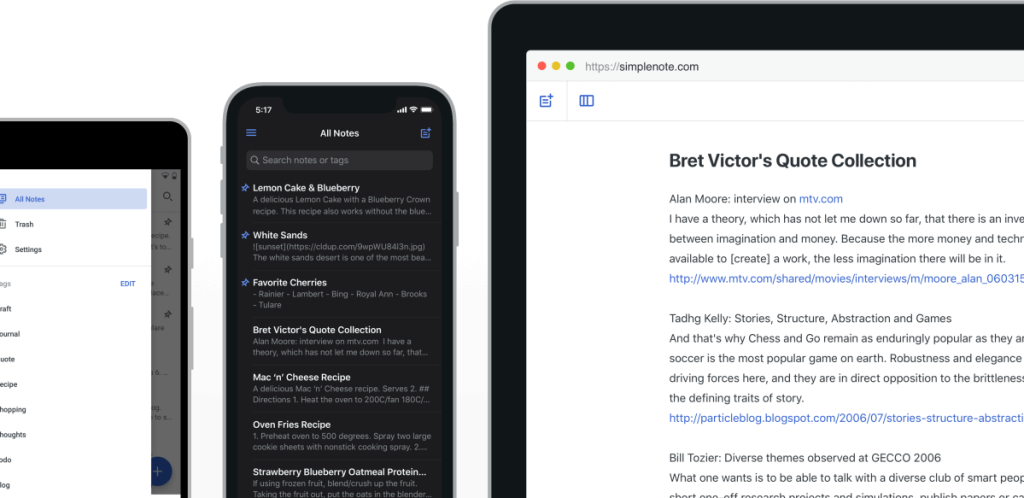
This section highlights the core features, use cases, and supporting notes.
Simplenote is most useful when it is judged as a deliberately lightweight synced note service rather than as a feature-maximal workspace. The official Simplenote homepage, signup flow, help center, import, export, Markdown, offline, and publish sections, developers page, and desktop release page checked on April 20, 2026 all point to the same story: fast note capture, synced access across devices, tags, Markdown support, and a small but practical sharing workflow. The homepage says The simplest way to keep notes and All your notes, synced on all your devices, which is a much clearer positioning than the current thin English page provides. That matters because Simplenote should not be evaluated as if it were trying to become a database, whiteboard, or project-management suite. Its help center documents the workflows that actually decide whether a minimalist note tool is viable in real life, including import, export, offline use, Markdown, and publishing. The developers page also states that all Simplenote apps are open source and ready for contributions, and the official Electron release page provides a concrete maintained desktop route for Windows and Linux users. Our grounded judgment is that Simplenote is strongest for users who want fast synced notes, plain-text-friendly writing, light organization through tags, and simple publishing or sharing without moving into a much heavier second-brain system. It is a weaker fit for users who need database-like structure, advanced task management, or a broad all-in-one workspace. Simplenote looks most defensible when the real need is a calm cross-device note layer that stays simple on purpose.
The current English page for Simplenote is still too thin for what the official product surfaces now show. The homepage checked on April 20, 2026 uses unusually direct language: The simplest way to keep notes and All your notes, synced on all your devices. It also states that users can get Simplenote for iOS, Android, Mac, Windows, Linux, or in the browser. That matters because Simplenote should be judged first as a lightweight cross-device note system, not as a stripped-down editor missing enterprise features.
The homepage matters because it states Simplenote’s real promise directly: simple notes, synced across devices, with tags, Markdown, and online publishing.
The official signup route keeps that promise practical. A synced note service is easier to trust when the onboarding path is direct and stays close to the actual app instead of pushing users through a cluttered funnel. Simplenote’s web app and account-creation flow make it feel like an everyday note layer rather than a complex suite that needs heavy setup before the first note exists.
The signup page matters because synced note-taking begins with a clean official onboarding path, not with unnecessary friction.The help page matters because it shows that Simplenote’s simple interface still sits on top of visible practical documentation.
The help center is one of the strongest signals that Simplenote’s simplicity is intentional rather than unfinished. It includes explicit sections for import, export, offline, Markdown, and publish, plus sharing and collaboration questions. That matters because a note app becomes easier to recommend when the official docs cover the workflows that usually decide whether users stay or leave.
The import section matters because a note app should acknowledge that many users arrive with existing notes from somewhere else.The export section matters because visible portability support makes a note app easier to adopt without lock-in anxiety.The Markdown section matters because lightweight structure is one of Simplenote’s clearest strengths for writers and technical users.The offline section matters because note apps need to remain useful even when connectivity is imperfect.
The publishing workflow gives Simplenote one of its more distinctive lightweight traits. Many minimal note apps stop at private storage, but Simplenote’s official help surface explicitly explains how publishing works. That gives the app a practical way to turn selected notes into simple public pages without forcing users into a separate blog or documentation system for every small shareable note.
The publish section matters because Simplenote can turn selected notes into lightweight public pages without much setup.
The developers and release surfaces add another layer of trust. The developers page says all of the Simplenote apps are open source and ready for contributions, which matters for users who care about transparency and longevity. The official Electron release page provides a concrete desktop route for Windows and Linux users instead of leaving the product framed as a mobile-only or browser-only service.
The developers page matters because public code and contribution paths improve trust in a long-lived note utility.The release page matters because desktop users need a concrete official route, not only a general promise that the app exists.
Our grounded judgment is that Simplenote is strongest for users who want fast synced notes, plain-text-friendly writing habits, light organization through tags, and simple publishing or sharing without building a heavier second-brain system. It is a weaker fit for users who want database-like structure, advanced project management, or a broad all-in-one workspace. Simplenote looks most defensible when the real need is a calm note layer that stays available across devices without turning every note into a complex document workflow.
Setup / Usage Guide
Installation steps, usage guidance, and common notes are maintained here.
The best way to start with Simplenote is to treat it as a deliberately lightweight synced note layer, not as a replacement for every document, wiki, or project system you already use. The official Simplenote materials checked on April 20, 2026 show a product centered on quick notes, tags, Markdown, publishing, and broad device access.
Start from the official homepage at https://simplenote.com/ so you evaluate the product in the right frame: simple notes synced across devices.
Create an account through https://app.simplenote.com/signup/ or sign in through the web app if you already have one.
Write a few short real notes first instead of importing everything immediately. Simplenote is easiest to judge when you feel how fast capture and sync work in ordinary use.
Add a small tag structure early. Tags are one of Simplenote's main organizational tools, so test whether they are enough for your actual note volume.
Enable Markdown if your writing habits benefit from plain-text structure. This is one of the clearest reasons technical users and writers stay comfortable in Simplenote.
Read the help sections for import and export before moving a large existing note collection.
Check the offline help guidance before depending on Simplenote during travel or unstable connections.
If you sometimes want to share cleaned-up notes publicly, read the publish help section and test it on one non-sensitive note first.
Desktop users should also review the official Electron releases so they know where the maintained Windows and Linux builds live.
Finish with one practical question: does Simplenote make note capture and retrieval calmer and faster for your real workflow, or do you actually need a heavier system with more structure than tags, Markdown, and simple publishing can provide?
A practical Simplenote setup usually means starting with a few real synced notes, validating tags and Markdown, checking import and export confidence, and only then deciding whether its deliberate simplicity is a strength for your workflow or a limit you will outgrow.
Related Software
Keep exploring similar software and related tools.
Node.js is a free, open-source, cross-platform JavaScript runtime that lets you run JavaScript for servers, APIs, command-line tools, scripts, and build workflows, backed by npm and a large first-party documentation ecosystem. Its real strength is not only backend JavaScript, but the way runtime, package management, CLI tooling, REPL workflows, and a built-in test runner can reduce setup friction for developers who want one practical platform from prototype to production.
Python is a general-purpose programming language that stays popular because it is readable, widely taught, and useful across automation, data work, AI, backend services, and scripting. It is one of the easiest languages to start with while still being powerful enough for serious long-term projects.
Visual Studio Code is worth recommending when it is judged as a practical development workspace instead of only as another text editor. The official materials checked on April 22, 2026 still position VS Code through its main site, documentation hub, download page, monthly updates, getting-started guide, themes guide, CLI guide, terminal basics, source-control overview, and settings-sync docs. That combination matters because many users do not only need a place to open files. They need an editor that can scale from note-sized edits to real development tasks with extensions, Git workflow, terminal access, language support, and a setup path that stays understandable for new and experienced users. VS Code is strongest for developers, technical learners, script writers, DevOps users, and general coding work where flexibility matters more than a giant IDE. It is weaker for readers who need every heavyweight enterprise IDE feature out of the box or who want an editor with almost no customization choices at all. Our grounded judgment is that VS Code still deserves to be recommended as one of the safest default development workspaces for Windows users because it balances approachability, extension depth, and official guidance better than many alternatives.
Rust is worth recommending when it is judged as a language-plus-toolchain ecosystem instead of only as another programming language homepage. The official materials checked on April 22, 2026 still position Rust through its main site, install guide, Rust book, Cargo book, Rust By Example, the installation chapter, the Hello Cargo chapter, the standard library docs, Clippy docs, and the Rust Playground. That combination matters because many users do not only need syntax. They need a practical route from installation to building, formatting, linting, learning, and testing real code. Rust is strongest for developers who care about performance, correctness, tooling quality, and long-term maintainability, especially when they are willing to learn a stricter model than scripting languages usually require. It is weaker for readers who want the easiest possible beginner syntax or who need instant scripting convenience more than disciplined compiled-language workflow. Our grounded judgment is that Rust still deserves to be recommended as one of the most complete modern toolchain experiences for systems and performance-conscious development because its official learning and tooling path remains unusually strong.
AIMP remains one of the more worthwhile Windows audio players for users who still manage real music libraries instead of living entirely inside streaming subscriptions. The official materials checked on April 17, 2026 show a desktop player built around broad audio-format support, 32-bit audio processing, multiple playlists, smart playlists, internet radio, library management, support for local files, NAS, cloud sources, and podcasts, plus built-in tools such as an audio converter and tag editor. The official Windows download page also showed a current stable line at v5.40.2715 dated April 11, 2026, while separately exposing a v6.00.3055 Beta test branch. The official FAQ keeps expectations grounded by stating plainly that AIMP is an audio player, not a video player. That makes AIMP strongest for people who organize local or mixed-source audio collections, care about playlists tags radio and plugins, and want a desktop player with real retention value, while it is a weaker fit for users who mainly want a streaming-first service shell or a minimal player with almost no setup depth.
Kate is a capable text editor for users who need something more serious than a barebones note pad but less overwhelming than a full IDE for every task. Its value is in balance: multiple documents, strong editing basics, and useful features without forcing a heavyweight development environment all the time.
Flameshot is an open-source screenshot tool for Windows users who want fast region capture, on-screen annotation, configurable shortcuts, and optional command-line control in one app. It is especially useful for support work, documentation, tutorials, and daily team communication where screenshots often need arrows, text, blur, or scripted capture actions.
WizNote is a Windows note-organization platform for users who want more than a blank text box and a sync button. The official pages checked on April 28, 2026 show a long-running desktop client download path, a separate rebuilt WizNote X branch, a support center with manuals across platforms, Windows plugins, and a Web Clipper for collecting online material into notebooks. It is best suited to users who want a broader notes ecosystem with desktop, web-capture, and reference-collection depth, and it is a weaker fit for people who only need the lightest possible local note editor.