Overview

This section highlights the core features, use cases, and supporting notes.

tl;dv is more useful as a meeting memory and follow-up system than as just another AI transcript recorder. Users looking for an AI meeting note taker for Zoom, Google Meet, and Microsoft Teams, CRM auto-fill from sales calls, or an AI meeting assistant for recurring customer meetings will get the most value when the real pain starts after the call: summaries, searchable recall, CRM updates, and next-step follow-ups. It is a strong fit for sales, customer success, recruiting, and internal syncs, but transcript accuracy, CRM field mapping, and AI-written drafts still need human review before anything important is logged or sent.

tl;dv makes the most sense when you stop thinking about it as an AI transcription toy and start thinking about it as post-meeting infrastructure. The official English homepage leads with note taking, but the practical value is what happens after the meeting ends: capture the discussion, turn it into usable notes, remember what was said later, and move the next actions into the tools your team already lives in. If you are searching for an AI meeting note taker for Zoom, Google Meet, and Microsoft Teams, tl;dv is easier to justify when recurring calls, not single demo calls, are where your memory and admin burden start to break down.


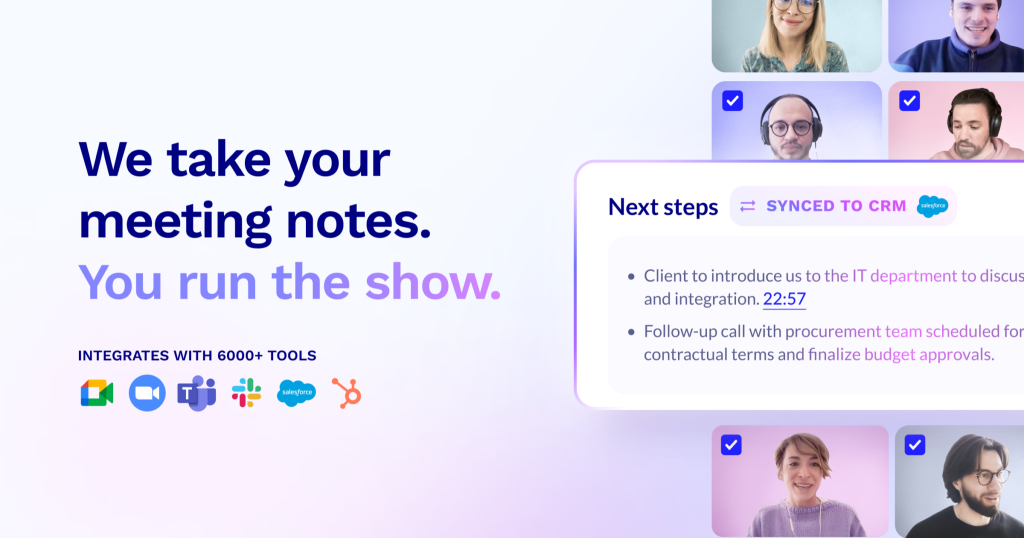
Annotated screenshot of the official tl;dv homepage highlighting the AI meeting notes positioning
This first screenshot matters because it shows tl;dv’s product boundary clearly: the tool is not only about recording a meeting, but about turning the meeting into usable notes you can work from later. Click the image to open the full-size screenshot.

The stronger hook is the manual work tl;dv tries to remove after every call. The official site now spells that out directly: no more manual updates, CRM handoff, and follow-ups handled after the meeting. That framing is important because many teams do not actually suffer from missing transcripts. They suffer from the thirty minutes after the call: updating call notes, logging outcomes, drafting the next email, and reconstructing what happened before the next touchpoint. That is why tl;dv feels more relevant to sales and customer-facing teams than to people who only need a raw transcript archive.


Annotated screenshot of the official tl;dv homepage showing the CRM and follow-up positioning
This section is useful because it makes the real promise obvious: tl;dv is trying to reduce after-call admin, not just create another transcript you still have to process yourself. Click the image to open the full-size screenshot.

Integrations are the next decision point. A meeting assistant becomes much more valuable once the notes and outcomes can move into the rest of your workflow without manual copying. The current integrations page highlights CRM and workflow handoff paths such as HubSpot, alongside broader categories for calendar, collaboration, note taking, and project tools. For teams comparing AI meeting notes with HubSpot integration or looking for a meeting transcript and summary tool for sales follow-up, this is one of the more important pages to check because it tells you whether tl;dv can live inside your existing stack instead of creating one more isolated destination.


Annotated screenshot of the official tl;dv integrations page highlighting a HubSpot CRM connection example
The integration screenshot has real decision value because it shows tl;dv in the context that matters most for many teams: whether meeting notes can be pushed into the CRM instead of being trapped inside the meeting tool. Click the image to open the full-size screenshot.

The sales workflow page reveals the product’s practical value even more clearly than the homepage. Instead of vague AI claims, it shows concrete post-call jobs: CRM auto-filler, follow-up emails, and meeting preparation. That combination is what makes tl;dv more interesting than simple note capture. Used well, it can shorten the gap between a customer conversation and the next action. For anyone searching for CRM auto-fill from sales calls or an AI meeting assistant for recurring pipeline reviews, this is closer to the real use case than generic “AI note taker” wording.


Annotated screenshot of the official tl;dv sales workflow page showing CRM auto-filler and follow-up workflow blocks
This screenshot earns its place because it shows real workflow blocks rather than abstract feature promises. It helps readers judge whether tl;dv will actually reduce repetitive sales admin after a meeting. Click the image to open the full-size screenshot.

Another reason tl;dv is worth a serious look is that it does not stop at one meeting at a time. The official homepage also pushes aggregated insights across meetings, which is where the software becomes more than a note taker. When a team runs repeated discovery calls, customer check-ins, hiring interviews, or internal project reviews, single-meeting summaries are not enough. What matters is whether patterns can be found across many conversations: repeated objections, recurring requests, deal risks, onboarding pain points, or the same action item being missed again and again. That is where tl;dv starts to become an AI meeting insights tool for sales and customer success teams, not just a recorder.


Annotated screenshot of the official tl;dv homepage showing the aggregated meeting insights section
This is one of the more useful official screenshots because it points to team-level value. If you only need one summary per call, many tools can do that. Aggregated insights are what make tl;dv potentially stickier in a real workflow. Click the image to open the full-size screenshot.

The official conversational intelligence positioning adds one more practical angle: question-based retrieval. In plain terms, tl;dv is trying to become a searchable memory layer for meetings. That can be genuinely useful when you need to answer specific follow-up questions quickly, prepare before the next call, or verify who said what without rewatching everything. It is still a tool that needs supervision, though. Speaker labels, subtle wording, and CRM field interpretation can all drift, so it should help humans remember and prepare faster, not replace verification for important decisions.

Our judgment is that tl;dv is most compelling for teams with repeated conversations and repeated admin, especially sales, customer success, recruiting, and structured internal meetings. It is less convincing if your workflow only needs a transcript or if your team is not willing to review AI-generated summaries and CRM updates before using them. Used with that expectation, tl;dv is easier to recommend as a meeting memory and follow-up system than as a magic autopilot for everything said on a call.

Setup / Usage Guide

Installation steps, usage guidance, and common notes are maintained here.

The fastest way to judge tl;dv is to test it on one real recurring meeting type, not on a random one-off demo call. The sequence below keeps the setup practical and closer to the way teams actually decide whether a meeting assistant is worth keeping.

  1. Open the official tl;dv site from the website button on this page and decide the first real use case before connecting anything. A weekly sales call, customer success check-in, recruiting interview, or internal project sync is a better test than an artificial sample meeting.
  2. Connect only the meeting platform and calendar flow you actually use first. If your team lives in Zoom, Google Meet, or Microsoft Teams, start there and avoid connecting every tool at once.
  3. Run one or two real meetings with clear consent and internal approval. This matters more than it sounds because privacy expectations, recording rules, and internal policy can become the real blocker long before features do.
  4. After the meeting, inspect the transcript and summary before touching CRM or automation. Check whether speaker labels make sense, whether product terms or customer names are accurate enough, and whether the summary structure is usable for your team.
  5. Look at the post-meeting output the way a working team would use it. Ask whether the notes make next steps, objections, risks, and decisions easier to find than your old workflow, or whether you still need to reconstruct too much by hand.
  6. If tl;dv offers note templates or summary structure options for your workflow, test them on the meeting type you actually repeat. Sales calls, hiring interviews, and customer success reviews usually need different note emphasis, so one generic output is rarely enough.
  7. Only after the notes feel stable should you test CRM handoff. Start with low-risk fields or simple summaries first instead of letting the tool write into every record automatically. Review each result manually until you understand where the AI is reliable and where it still drifts.
  8. Test the follow-up workflow next. Let tl;dv draft an email or next-step outline, but treat it as a first draft. Rewrite anything that sounds generic, misses commercial nuance, or skips the actual outcome of the call.
  9. Once you have a small set of real meetings, explore the cross-meeting view. This is the stage where tl;dv can become more than a note taker by surfacing repeated objections, recurring customer requests, meeting themes, or common blockers across similar calls.
  10. Use the searchable memory side for preparation, not blind trust. Ask specific questions before the next meeting, verify what the tool retrieves, and make sure important details still match the real conversation before quoting them internally or logging them to a system of record.
  11. Review integration fit before expanding usage. If your team uses HubSpot, Slack, project tools, or other workflow systems, decide whether tl;dv shortens the path between conversation and action or merely creates another place to check.
  12. After a week or two of real use, make a keep-or-drop decision. Keep tl;dv if it consistently reduces after-call admin and improves follow-up quality. Drop it if transcript cleanup, CRM correction, and draft rewriting erase the time it saves.

A practical evaluation order works well for most teams: meeting capture first, summary quality second, CRM and follow-up third, cross-meeting insights last. That order shows quickly whether tl;dv is helping your real workflow instead of only producing impressive demo outputs.

Related Software

Keep exploring similar software and related tools.