Overview

This section highlights the core features, use cases, and supporting notes.

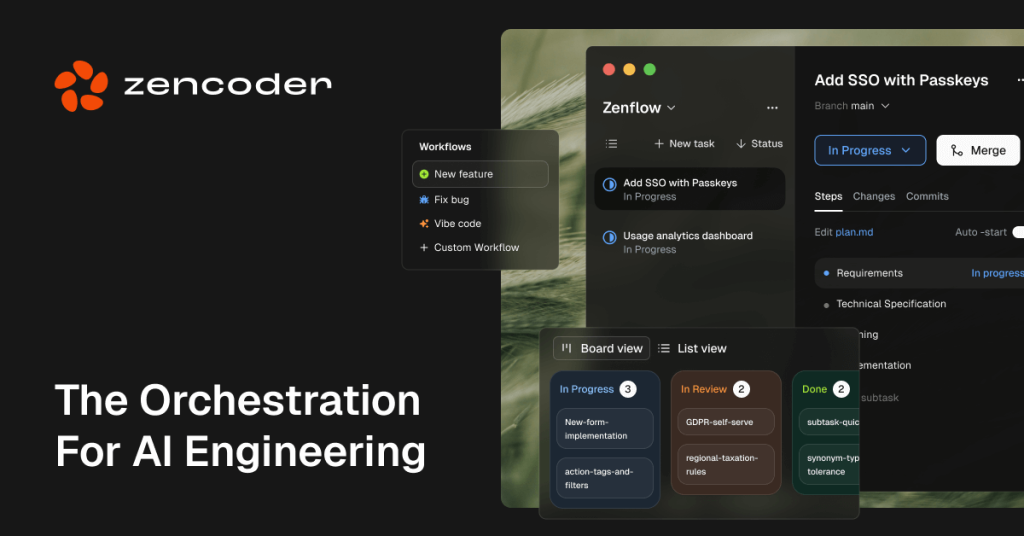
Zencoder is best understood as a multi-agent coding and workflow platform rather than as another passive AI coding sidebar. The official materials checked on April 16, 2026 show a broader system: multi-agent orchestration for planning, coding, testing, review, and verification; install surfaces spanning Zenflow Code, Zenflow Work, and IDE agents for VS Code and JetBrains; strong emphasis on multi-repo indexing and repo awareness; development-stack integrations across Jira, GitHub, GitLab, Sentry, and CI systems; guided workflows that generate specs before execution; specialized agents plus Repo Grokking for large-codebase understanding; and a current product-updates page with March 2026 and February 2026 workflow changes. That makes Zencoder most relevant for teams who want execution and orchestration across the real dev stack, not only faster prompt answers.

The current English page for Zencoder is still too thin for what the official materials now show. The official site checked on April 16, 2026 positions Zencoder around multi-agent orchestration for code and work, not around a simple single-agent coding helper. The same product framing also emphasizes planning, building, testing, verification, architectural awareness, and full dependency mapping across the codebase.

Annotated reference image based on the official Zencoder site showing multi agent orchestration for code and work plus planning building testing and verification across the codebase
The official site matters because Zencoder is framed as an execution system for engineering work, not only as a prompt assistant.

The download page makes the install surface much clearer. Zencoder says Zenflow Code, Zenflow Work, and IDE Agents are all in one place, then points users to concrete install routes for VS Code and JetBrains. That matters because a practical recommendation needs to show where the product actually lives before any agent work starts.

Annotated reference image based on the official Zencoder download page showing Zenflow Code Zenflow Work and IDE Agents plus VS Code and JetBrains installation routes
The download page matters because it clarifies the practical install surface instead of leaving Zencoder as a vague cloud-only promise.

The coding-agent product page explains why Zencoder is more than an autocomplete layer. The page says the coding agents understand the entire repository, edit across files, and validate their own code. It also highlights starting a task with a guided workflow and seeing the tech spec first before building step by step, which is a much more structured promise than asking for code in a blank box.

Annotated reference image based on the official Zencoder coding agent page showing guided workflows tech specs multi file editing and self validation across the repository
The coding-agent page matters because it shows Zencoder trying to push engineering tasks forward systematically instead of only returning suggestions.

The integrations page is one of Zencoder’s stronger practical arguments. The official site says Zencoder connects with more than twenty tools including Jira, Sentry, GitHub, and GitLab. It describes turning requirements into user stories, generating code from API specs, fixing CI or CD failures, and resolving production-facing issues through monitoring and security tooling. That is the kind of workflow breadth many coding pages never reach.

Annotated reference image based on the official Zencoder integrations page showing Jira Sentry GitHub GitLab and other tools across planning coding CI monitoring and security workflows
The integrations page matters because Zencoder becomes more valuable when it can operate through the actual development stack rather than beside it.

The enterprise page makes the larger-team fit clearer. Zencoder says agents can run across the IDE, desktop app, and CI or CD pipeline with built-in verification and multi-repo intelligence. It also describes one agent building, another reviewing, and a third auditing. That matters because enterprises usually care as much about checks, roles, and rollout control as they care about raw generation speed.

Annotated reference image based on the official Zencoder enterprise page showing agents across the IDE desktop and CI pipeline with built in verification and multi repo intelligence
The enterprise page matters because it connects Zencoder’s agent story to review governance and organization-wide rollout rather than only to individual coding speed.

The quickstart docs provide a usable first-run path. The official docs explain how to get started with Zencoder in VS Code or JetBrains, then guide users through login, running the Repo-Info Agent, using Ask Agent or Coding Agent, generating unit tests, setting custom agents, adding Zen Rules, connecting Jira, and adding MCP servers. That is strong evidence that Zencoder expects to be configured into a real workflow rather than tried once and forgotten.

Annotated reference image based on the official Zencoder quickstart docs showing VS Code or JetBrains setup Repo Info Ask Agent Coding Agent unit testing Zen Rules Jira and MCP setup
The quickstart page matters because it shows how Zencoder is supposed to move from install to actual repository work without leaving users to improvise the first session.

The coding-agent docs add an important detail: Zencoder says the agent converts tasks such as bug fixes and feature requests into systematic execution plans. The docs specifically call out generating functional specifications and task lists before execution. That is a useful distinction because many AI coding tools only talk about output, while Zencoder is also selling a planning layer ahead of output.

Annotated reference image based on the official Zencoder coding agent docs showing functional specifications task lists and systematic execution planning before code changes
The coding-agent docs matter because they show Zencoder trying to front-load understanding and planning before the agent starts editing files.

The Repo Grokking docs are one of the most important technical claims behind that planning story. Zencoder says this technology gives the system understanding of the entire repository structure and dependencies, can analyze million-line codebases in under thirty seconds, and works with context windows up to twenty times larger than other code-generation tools. Whether every number holds in practice or not, this is clearly the core of Zencoder’s repo-scale positioning.

Annotated reference image based on the official Zencoder Repo Grokking docs showing whole repository structure dependency awareness and rapid analysis of large codebases
The Repo Grokking page matters because Zencoder’s multi file and multi repo story depends on real codebase understanding, not only longer answers.

The AI-agents docs help explain why Zencoder keeps using multi-agent language. The docs describe specialized agents for coding, testing, repairing code, and improving code quality. That makes the platform easier to judge because Zencoder is not only claiming one assistant can do everything. It is explicitly dividing work into roles that match common engineering tasks.

Annotated reference image based on the official Zencoder AI agents docs showing specialized agents for coding testing repair and code quality workflows
The AI-agents page matters because it shows Zencoder distributing work across specialized roles instead of pretending one agent is best at everything.

A current product-updates check is still necessary for any AI coding page. On April 16, 2026, the official updates page highlighted March 2026 improvements around smarter IDE workflows, stronger reviews, skills in the UI, better subagent control, and stability upgrades. The February 2026 update also highlighted new models, a research agent, scheduled automation in Zenflow, and UX changes. This is useful because it shows Zencoder still changing at the workflow level rather than standing still after launch.

Annotated reference image based on the official Zencoder product updates page showing March 2026 and February 2026 workflow subagent model and automation changes
The updates page matters because it confirms Zencoder is still evolving its planning review subagent and automation surface, not only polishing copy.

Our grounded judgment is that Zencoder is most worth installing for developers and engineering teams who want one agent platform that spans repository understanding, guided task execution, integration-heavy workflows, specialized agents, and verification across the IDE and pipeline. It is a weaker fit for readers who only want the lightest inline assistant, who do not need integration and orchestration depth, or who would rather keep planning, coding, review, and automation in separate tools.


Setup / Usage Guide

Installation steps, usage guidance, and common notes are maintained here.

The best way to evaluate Zencoder is to treat it as an execution and orchestration platform, not only as an AI editor add-on. The official materials checked on April 16, 2026 show install paths for VS Code and JetBrains, guided workflows that generate specs before coding, specialized agents, repo-awareness technology, stack integrations, and team-oriented verification.

  1. Start from the official website at https://zencoder.ai/, then open the official download page so you understand the current product surface before installation.
  2. Use the official install path that fits your environment. The download page specifically points users to VS Code and JetBrains, so choose the editor you already use instead of treating setup as a throwaway experiment.
  3. Log in and open a real repository rather than an empty demo folder. Zencoder's value depends heavily on repo awareness, so toy examples are a weak way to judge it.
  4. Run the official Repo-Info Agent early. The quickstart docs use this step to capture repository information and create rule context, which helps later agent work stay closer to the real codebase.
  5. Start with Ask Agent on one bounded problem so you can see how Zencoder reasons about the codebase before you let it change files. A bug fix or a focused feature request is usually better than an open-ended product prompt.
  6. Move to the Coding Agent once the task is clearly defined. The official docs say Zencoder generates specifications and task lists before execution, so read that structure before approving broader code changes.
  7. Use specialized agents when the task fits them. Zencoder's official materials describe agents for coding, testing, repair, and code quality, so do not force every job through the same workflow if a more specific agent exists.
  8. Generate or improve tests as part of the first evaluation. The quickstart flow explicitly includes unit-testing help, which is a better measure of platform usefulness than code generation alone.
  9. Add only the integrations you actually need at first. The official site highlights Jira, GitHub, GitLab, Sentry, and CI tools, but a smaller integration set is easier to verify before expanding the workflow.
  10. Configure Zen Rules, custom agents, and MCP servers only after the base workflow is understandable. These features add real power, but they also add more moving parts than a casual first run needs.
  11. If your team works across many repositories or complex dependencies, pay close attention to the Repo Grokking and multi-repo intelligence materials. Zencoder is making repo-scale understanding one of its biggest claims, so this should be tested on a codebase that actually challenges that claim.
  12. If the rollout is for a team, read the enterprise page before deciding whether to keep it. Zencoder's stronger value for larger organizations is tied to built-in verification, multi-agent review, and workflow coverage across IDE and pipeline surfaces.
  13. Before keeping Zencoder in daily use, check the current official product-updates page. On April 16, 2026, the latest visible update buckets included March 2026 and February 2026 workflow changes, which is a reminder that the product is still moving fast enough for update habits to matter.
  14. Finish the evaluation with one practical question: do you only need a lighter coding helper, or do you actually want a broader multi-agent system that plans, edits, tests, reviews, and integrates across the development stack?

A practical Zencoder setup usually means installing the official extension in the editor you already use, opening a real repository, letting the Repo-Info Agent capture project context, testing Ask Agent and Coding Agent on one bounded engineering task, adding unit testing and one or two core integrations, then deciding carefully whether the larger multi-agent and orchestration surface is truly worth keeping in your workflow.

Related Software

Keep exploring similar software and related tools.