Overview

This section highlights the core features, use cases, and supporting notes.

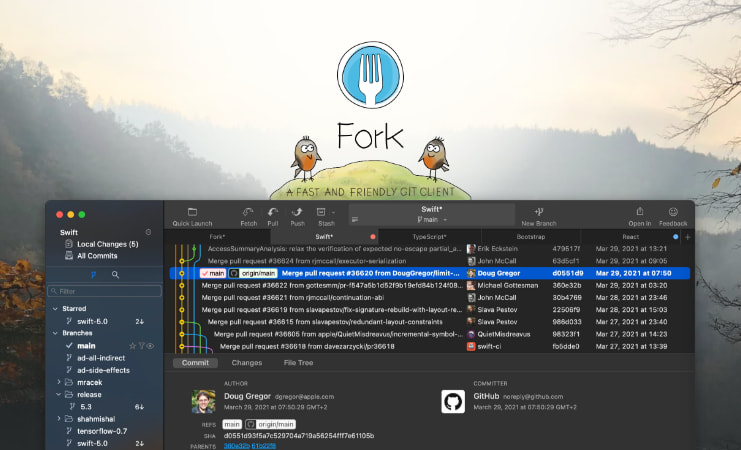
Fork is a graphical Git client for Windows that helps users review changes, manage branches, resolve merges, and handle commits without staying in the terminal for every step. It is a strong fit for developers who want a cleaner visual Git workflow while still keeping serious repository work under control.

Fork is built for developers who already use Git but do not want every everyday action to happen in a terminal window. Branches, staging, diffs, rebases, and merge reviews become easier to inspect when you can see repository state clearly instead of reconstructing everything from command output. That is the main reason Fork stands out on Windows.

It is most suitable for developers and technical contributors who understand version-control basics and want a graphical client that stays practical rather than decorative. If your day includes reviewing changed files, moving between branches, or checking what is about to be committed, a good visual client can reduce small mistakes and save time.

What makes Fork worth keeping is balance. It gives you a clearer view of Git history and working tree changes without pretending Git has become simple just because the buttons are graphical. That combination helps experienced users move faster while still seeing what they are about to do.

The right expectation is that Fork supports a Git workflow, not replaces Git judgment. You still need to understand branch state, merge consequences, and what you are pushing. Used with that mindset, it becomes a very effective Windows Git client for daily repository work.


Setup / Usage Guide

Installation steps, usage guidance, and common notes are maintained here.

1. Open the official Fork site and download the current Windows installer from the official source.

2. Install the client and launch it once so you can connect it to your existing Git environment before importing important repositories.

3. Make sure Git is already installed on the machine and confirm Fork can detect the correct executable if it asks for one during setup.

4. Add one familiar repository first and review the working tree, history, and branch views so the interface feels anchored in a project you already understand.

5. Test a safe workflow such as staging a small change, creating a commit, and inspecting the diff before trying more advanced operations.

6. Review merge and rebase options carefully. Graphical Git clients make these actions easier to click, but not less important to understand.

7. Configure authentication for your hosting platform and verify remotes before pushing anything from a newly added repository.

8. Use Fork to inspect history and compare branches regularly, but keep a habit of reading what the client is about to do before confirming major actions.

9. Keep Fork updated from the official site and remove repositories you no longer manage so the workspace stays focused and easy to trust.

Related Software

Keep exploring similar software and related tools.