Overview

This section highlights the core features, use cases, and supporting notes.

Langflow is a low-code AI builder for teams that want to create agentic and RAG workflows with a visual canvas, reusable templates, and multiple installation paths. Its practical value comes from helping users move from experiment to working flow faster, especially when they need more structure than ad-hoc notebooks but less friction than building every orchestration layer from scratch.

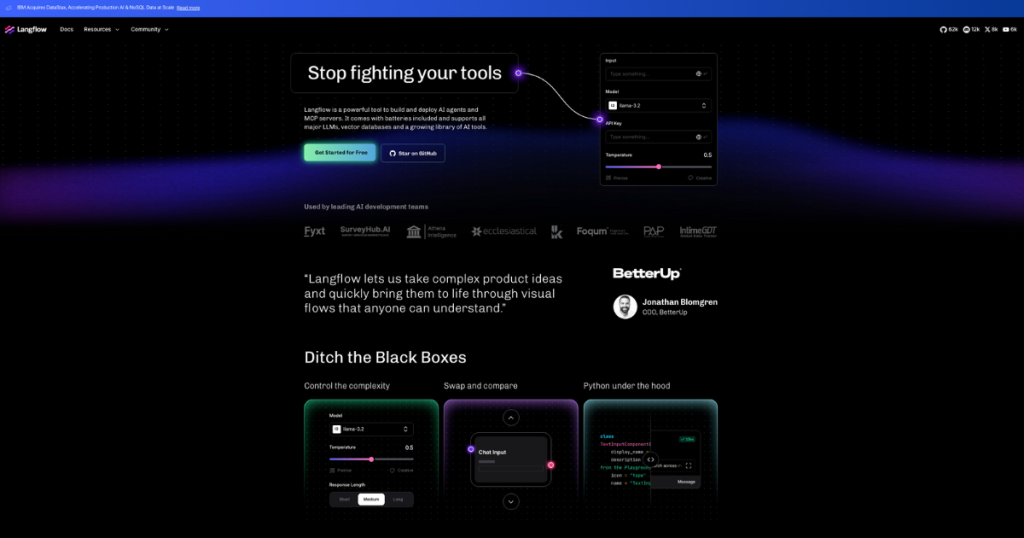
Langflow is best understood as a low-code workflow builder for agentic and RAG applications, not as a finished end-user AI product. On April 14, 2026, the official site at langflow.org publicly positioned the platform around a visual builder, reusable templates, and deployment-minded workflows. That framing matters because many teams do not need another chatbot demo; they need a way to assemble, test, and evolve flows with less friction than a fully code-first stack.

Annotated screenshot of the official Langflow homepage hero
The hero matters because Langflow is openly targeting teams frustrated by scattered AI-building workflows.

The homepage sections are practical because they speak directly to build friction. Create your first flow, From Notebook to Production, and Drag. Drop. Deploy. all point to the same real promise: reducing the distance between experimentation and something that can actually be tested, shared, and shipped. That makes Langflow relevant for users searching terms like low-code AI builder, visual RAG workflow builder, or drag-and-drop agent pipeline tool.

Annotated screenshot of the official Langflow first flow section
The first-flow section matters because faster onboarding is a core part of Langflow’s value.
Annotated screenshot of the official Langflow notebook to production section
This section is useful because it shows Langflow trying to bridge the usual gap between prototypes and deployable work.
Annotated screenshot of the official Langflow drag drop deploy section
Drag-drop-deploy matters because visual iteration is one of Langflow’s clearest public differentiators.

The public Use Cases page adds real decision value because it exposes templates instead of vague promises. Public entries such as call classification analytics, CSV query assistant, data extraction, PRD draftsman, bug report deduplicator, and contract risk scanning show that Langflow is not only for one narrow chatbot scenario. It is more useful when the team already has a business or operations problem in mind and wants a fast way to adapt an existing pattern.

Annotated screenshot of the official Langflow use cases page
The use-cases page matters because templates make Langflow easier to evaluate against real work, not abstract hype.

The documentation is another strong signal. The docs homepage explains what Langflow is, while the installation guide exposes several routes: desktop, Docker, and the OSS Python package. That matters because Langflow is not a single-path SaaS product. Some users want a local desktop start, some want Docker, and some want to work closer to the open-source package. A good Langflow page should set that expectation clearly.

Annotated screenshot of the official Langflow docs homepage
The docs homepage matters because Langflow is easier to judge when the platform model is explained, not just marketed.
Annotated screenshot of the official Langflow installation guide
The install guide is useful because it makes the platform’s multiple onboarding paths visible.

The desktop page is especially practical for users who want to try Langflow without setting up a full self-hosted stack on day one. Since the official homepage Get Started for Free path pointed to the desktop route during this run, it is reasonable to treat desktop as the clearest public first-use entry. Our grounded judgment is that Langflow is most worth trying for builders, product teams, and internal platform teams who want visual AI workflow assembly plus reusable templates. It is less suitable for users who only want a ready-made chatbot or who expect low-code tooling to remove the need for architecture and evaluation decisions.


Annotated screenshot of the official Langflow desktop page
The desktop page matters because it offers a lower-friction official starting point for many new users.

Setup / Usage Guide

Installation steps, usage guidance, and common notes are maintained here.

The best way to start with Langflow is to choose one real workflow problem first, then pick the lightest official installation path that lets you test it quickly.

  1. Open the official site at https://www.langflow.org/ and confirm that your use case actually fits a builder platform. Langflow makes more sense when you are designing flows, not when you only need a finished app someone else already packaged.
  2. Use the public official start path that the homepage exposes. In this run, Get Started for Free pointed to https://www.langflow.org/desktop, which is a practical first stop for many users.
  3. Before installing anything, choose one narrow first workflow. Good starting points are document question answering, data extraction, CSV analysis, or a simple internal assistant. Do not begin with a giant all-purpose agent platform on day one.
  4. If you want the lowest-friction trial, review the desktop route first. It is the easiest way to test whether the visual builder feels faster than your current notebook or script workflow.
  5. If you need more control or team deployment later, read the official installation guide at http://docs.langflow.org/get-started-installation. Langflow publicly documents desktop, Docker, and OSS Python-package routes.
  6. Use the templates on the official use-cases page as starting patterns, not as final solutions. They are most helpful when they reduce blank-canvas time, not when you copy them without understanding the flow.
  7. When you build your first flow, keep it small enough that you can understand every component. Low-code tools become confusing fast if the first successful result already hides too much logic.
  8. Test with one real dataset or document sample from your actual workflow. Synthetic toy inputs make it harder to judge whether the flow is genuinely useful.
  9. Inspect how the flow behaves step by step before you try to scale it. The value of a visual builder is not only speed; it is also transparency while the workflow is still small enough to reason about.
  10. If your goal becomes more serious than local experimentation, revisit installation and deployment choices before expanding the flow. Desktop convenience is helpful, but it is not always the right long-term path for team usage.
  11. Keep your prompts, component choices, sample inputs, and evaluation notes outside the canvas too. A builder should reduce friction, not become your only source of operational memory.
  12. Lower expectations in one important area: low-code does not remove the need for good workflow design. You still need to understand retrieval quality, prompt behavior, and failure cases.
  13. Decide whether Langflow belongs in your workflow based on one practical question: does it help you build, test, and refine useful flows faster than your current mix of notebooks, scripts, and ad-hoc tools?

A practical long-term Langflow setup usually looks like this: start from the official desktop or install guide, validate one small workflow with real data, borrow templates only where they save time, document your own flow decisions outside the canvas, and only expand toward team or production usage after the underlying logic is already stable.

Related Software

Keep exploring similar software and related tools.