Overview

This section highlights the core features, use cases, and supporting notes.

Pieces is most useful as a local-first AI memory tool for developers, not as another generic code generator. Users who jump between IDE, browser, terminal, docs, and AI assistants will get the most value when the real pain is context loss: forgetting what they just researched, where a snippet came from, which file or app it belonged to, or what the surrounding decision was. It fits developer second-brain workflows, AI memory for VS Code or mixed IDE environments, and privacy-sensitive teams that prefer on-device capture, but passive memory still needs review and curation or it can turn into background noise instead of useful recall.

Pieces makes more sense when you stop judging it as an AI coding assistant and start looking at it as a developer memory layer. The official site focuses on not forgetting what you did, in which app, and when. That is a more specific and more practical promise than the usual “write code faster” pitch. Many developers already have editors, chat tools, and search tools. The harder problem is recovering work context after interruptions, meetings, branch changes, browser detours, and assistant-heavy sessions. For users searching for an AI memory tool for developers or a local-first developer memory workspace, this is the real problem Pieces is trying to solve.


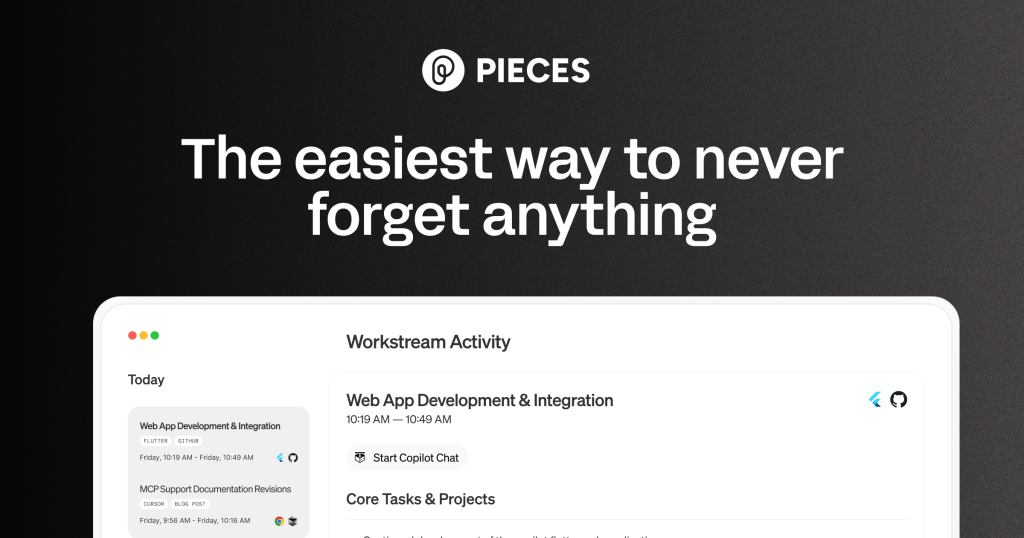
Annotated screenshot of the official Pieces homepage showing the developer memory positioning
This homepage screenshot is worth keeping because it shows the product boundary immediately: Pieces is selling memory and context recovery, not just another prompt box for code generation. Click the image to open the full-size screenshot.

The most practical idea on the site is automatic capture of workflow context. That matters because developers rarely lose only one snippet. They lose the path that led to it: the browser tab, doc page, repo state, note, or assistant exchange around it. A developer second-brain tool is only valuable if it helps reconstruct that path later. Pieces is more convincing here than many snippet managers because the product language is about returnable context, not only saved text. For engineers who context-switch constantly, that can be more useful than one more autocomplete feature.


Annotated screenshot of the official Pieces site showing workflow memory and context history
This screenshot has real user value because it explains why passive capture can matter: the goal is not to store random fragments, but to make past work sessions easier to recover when you need them. Click the image to open the full-size screenshot.

The official documentation strengthens the case because it describes Pieces as a long-term memory platform and connects that memory to MCP-style assistant workflows. That is important. A lot of “AI memory” products stay vague about where the context actually goes or how it enters daily tools. Pieces is more credible because the docs treat memory as infrastructure that should feed real workflows, including assistant context, retrieval, and tool integration. If you are evaluating MCP memory or a developer context tool that can support LLM-assisted work without becoming the whole workflow itself, the docs angle matters more than the homepage slogans.


Annotated screenshot of the official Pieces documentation showing the long-term memory platform framing
The docs screenshot deserves a place in the article because it shows that Pieces has an operating model behind the marketing: memory, MCP, integrations, and workflow guidance are documented instead of left as vague promises. Click the image to open the full-size screenshot.

Privacy is another reason Pieces stands out. The official site keeps returning to on-device behavior, local-by-default design, and the absence of external servers for core capture. That is not just a branding detail. Many developers are willing to try an AI memory system only if it does not immediately create a cloud privacy headache around code fragments, research history, meeting notes, or internal decision trails. Pieces will not eliminate all privacy questions, and users should still read the current docs carefully, but a local-first developer memory workspace is a very different proposition from a memory layer that depends entirely on remote storage.


Annotated screenshot of the official Pieces site showing local-first and privacy-focused messaging
This section is valuable because it addresses a real adoption blocker. Developers considering AI memory for code and research usually want to know early whether the product is local-first or cloud-first. Click the image to open the full-size screenshot.

The plugin story also matters more than it first appears. Pieces is easier to recommend because it shows clear support for tools developers already live in, including VS Code, Visual Studio, JetBrains, and CLI-oriented workflows. That makes it more than a standalone memory app you forget to open. For anyone comparing AI memory for VS Code or IDE workflow capture, integration quality is what determines whether the product becomes a daily habit or stays a nice idea. A memory system only works if it shows up where the work actually happens.


Annotated screenshot of the official Pieces plugins page showing IDE and CLI integration options
The plugin screenshot earns its place because it shows how Pieces can become part of real development flow. IDE and CLI support matter much more than glossy claims when you are testing a tool for everyday recall and context recovery. Click the image to open the full-size screenshot.

Our judgment is that Pieces is strongest for developers, technical writers, solution architects, and agent-heavy users who lose context faster than they lose code. It is less impressive if you expect perfect automatic organization or a full replacement for intentional documentation. Passive memory still needs pruning, naming, and occasional discipline or the archive turns noisy. Used well, Pieces can reduce the cost of resuming work and re-finding context. Used lazily, it becomes another place where information accumulates faster than understanding.


Setup / Usage Guide

Installation steps, usage guidance, and common notes are maintained here.

The best way to test Pieces is to treat it as a context-recovery tool from day one, not as a feature checklist. The steps below keep the trial small, practical, and aligned with what the official site and docs actually promise.

  1. Open the official Pieces site from the website button on this page and install the desktop app or current main product entry that the official docs recommend for your platform.
  2. Before connecting everything, decide what problem you want Pieces to solve first. A good first target is simple: re-finding code snippets, remembering recent research context, or recovering what you were doing after an interruption.
  3. Connect one real work surface first, preferably VS Code, a JetBrains IDE, or the browser workflow you use most. Starting with one integration makes it much easier to judge signal versus noise.
  4. Do a short real session instead of a fake demo. Read a doc page, open a repo, copy a few code fragments, ask one assistant question, and switch between two or three related tasks the way you normally do.
  5. After that session, test retrieval before adding more tools. Search for the exact snippet, concept, or activity you just touched and see whether Pieces helps you recover context faster than your normal editor history or browser history.
  6. Review what was captured and look for the balance between usefulness and clutter. If everything looks noisy already, narrow the scope before you continue. Passive memory only works when the captured stream stays interpretable.
  7. Open the official docs and read the sections about long-term memory, integrations, and MCP-related workflow only after the first local trial. The documentation makes more sense once you have real activity to compare against it.
  8. If you care about privacy, check the current local-storage and processing behavior in the official documentation before trusting the tool with sensitive work. Pieces is positioned as local-first, but your own risk standard should still guide adoption.
  9. Only then add a second integration. A browser plus one IDE is usually enough to test whether Pieces can actually bridge research and implementation instead of capturing two separate piles of activity.
  10. Try one assistant-context or MCP-related workflow if that is part of your stack. Keep the test practical: see whether the retrieved context genuinely improves the answer, not just whether the feature exists.
  11. Avoid importing or capturing everything too early. The fastest way to ruin an AI memory trial is to create a huge archive before you know how you will retrieve and review it.
  12. After several work sessions, decide whether Pieces is reducing resume time, search time, and context-switch cost. Keep it if it helps you return to work with less friction. Skip it if the memory layer feels more impressive than useful.

A practical evaluation order works well for most users: one IDE first, one real session second, retrieval test third, docs and privacy review fourth, assistant-context experiments last. That order shows quickly whether Pieces is improving your daily workflow instead of only adding another layer of software.

Related Software

Keep exploring similar software and related tools.