Overview

This section highlights the core features, use cases, and supporting notes.

Wordtune is one of the clearer fits for people who already have text to improve and want help rewriting, paraphrasing, summarizing, checking grammar, and polishing tone without switching to a full blank-page AI workflow every time. Wordtune's official homepage, Chrome extension page, summarizer page, AI writing assistant page, rewrite page, grammar page, proofreading page, Humanize AI page, plans page, and privacy policy checked on April 18, 2026 show a product that is centered on writing refinement rather than on generic chat. The official site frames Wordtune around expressing yourself with confidence through paraphrase, rewrite, grammar correction, and summarization, while the Chrome extension page makes it clear that the product is meant to work directly inside browser writing. What keeps Wordtune worth using is the practical shape of the workflow. You can rewrite emails and messages, summarize text or YouTube material, continue a draft with AI writing help, run grammar and proofreading passes, and use the browser extension where daily writing actually happens. Wordtune is also honest enough about being a paid service with tier boundaries, and the privacy policy matters because browser-connected writing tools often process real drafts, personal notes, and work communication rather than toy examples. That makes Wordtune strongest for people who revise a lot of everyday English writing and want a web-first assistant that stays close to the draft. It is a weaker fit for users who want a fully offline desktop editor, do not like browser-based tools, or expect one AI tool to replace every part of the writing process without any judgment from the user.

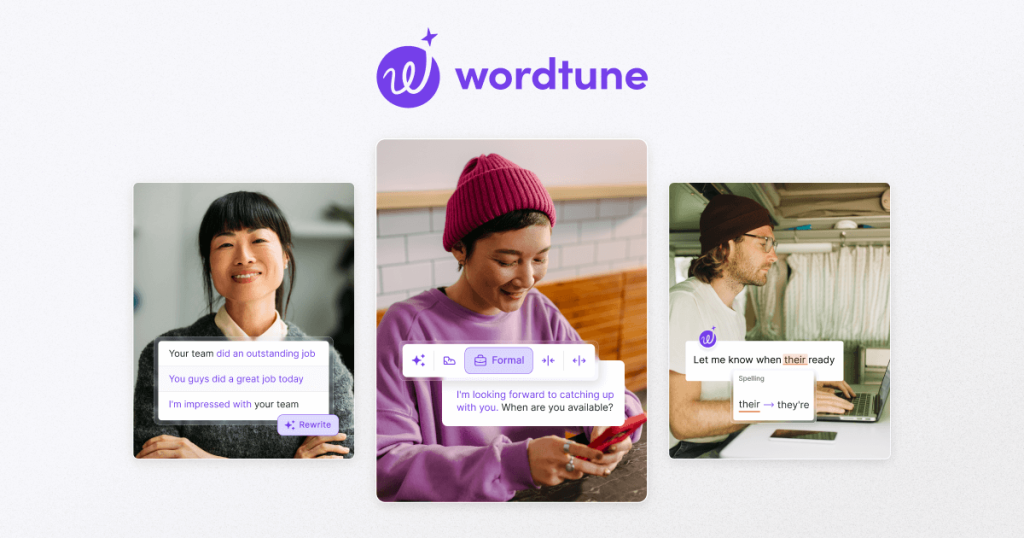
The current English page for Wordtune is still too thin for what Wordtune’s own materials now show. The official homepage checked on April 18, 2026 frames Wordtune around expressing yourself with confidence and describes it as a free AI writer that can paraphrase, rewrite, and correct your grammar. That matters because Wordtune is not best judged as a blank chatbot. It is stronger as a writing-refinement tool for drafts, messages, and working text that already exist.

Annotated reference image based on the official Wordtune homepage highlighting paraphrase rewrite grammar correction and confident expression
The homepage matters because Wordtune is positioned as a writing workflow tool for improving existing text, not only as a generic AI chat surface.

The official Chrome Extension page is one of the strongest reasons the product remains practical. Wordtune says the extension supports rewriting, proofreading, and perfecting text right in the browser. That is important because many users decide whether to keep a writing assistant based on whether it appears where emails, forms, and documents are actually written. A browser-first workflow is much easier to keep than a tool that only lives in a separate tab.

Annotated reference image based on the official Wordtune for Chrome page highlighting browser-based rewriting and proofreading
The Chrome extension matters because browser integration is one of the clearest reasons Wordtune can stay part of daily writing.

The Summarizer page also expands Wordtune beyond sentence rewriting. The official page says users can summarize any text or YouTube video and reduce reading and watching time. That is useful because many real writing tasks begin with source material: a long article, meeting notes, a report, or a video that has to be turned into something shorter and clearer before any reply or draft is written.

Annotated reference image based on the official Wordtune summarizer page highlighting text and video summarization
The summarizer matters because Wordtune becomes more useful when it can help process input material as well as improve output text.

The AI Writing Assistant page shows that Wordtune is also trying to help with continuation, not only correction. The official page says users can create and edit content and let Wordtune continue writing based on their unique context. That makes the product easier to trust than a fully hands-off generator, because the value here is not just automatic output. It is assisted drafting that stays close to the user’s own direction.

Annotated reference image based on the official Wordtune AI writing assistant page highlighting contextual drafting and editing
The AI writing page matters because Wordtune is positioning itself around assisted drafting with user control rather than around generic text generation alone.

The official Rewrite page keeps Wordtune grounded in one of its clearest real jobs. The page title is Free Online Rewriting Tool, and the page says users can instantly paraphrase emails and messages. That matters because a large share of real-world writing work is revision: making a sentence clearer, softer, shorter, or more direct without starting from zero.

Annotated reference image based on the official Wordtune rewrite page highlighting instant paraphrasing for emails and messages
The rewrite page matters because revision quality is one of the main reasons to keep Wordtune around for day-to-day writing.

The Grammar and Proofreading pages matter for the same practical reason. Wordtune is not only offering alternate phrasing; it is also trying to cover correctness and final polish. The grammar page says it can correct grammar and spelling, while the proofreading page emphasizes proofreading and clarity. Together those pages make Wordtune easier to see as a full drafting-and-polish assistant instead of a paraphrase button only.

Annotated reference image based on the official Wordtune grammar checker page highlighting grammar and spelling correction
The grammar page matters because correctness is part of whether a writing assistant feels dependable enough for real professional use.
Annotated reference image based on the official Wordtune proofreading page highlighting clarity and final polish work
The proofreading page matters because many drafts are almost done already and need a final polish pass more than a full rewrite.

The Humanize AI page shows Wordtune responding to a newer kind of demand. The company now places AI-text humanizing directly inside the product surface. That matters because many users are no longer only asking whether AI can generate text. They are asking whether stiff machine-sounding output can be made more natural, more readable, and less obviously synthetic.

Annotated reference image based on the official Wordtune Humanize AI page highlighting more natural wording for AI-generated text
The Humanize AI page matters because modern writing assistants are often judged by how well they can soften awkward AI phrasing.

The official Plans page adds another important piece of context. Wordtune visibly includes plan and pricing language together with Unlimited and Business references. That matters because writing assistants are easy to overrate if the long-term cost model is hidden. The page makes it easier to judge Wordtune as an ongoing workflow tool rather than as a trial that only looks simple at the start.

Annotated reference image based on the official Wordtune plans page highlighting pricing and tier structure
The plans page matters because long-term fit depends partly on whether Wordtune’s upgrade model matches the user’s real writing workload.

The Privacy Policy matters just as much. Wordtune’s official privacy page explicitly says We Care About Your Privacy and visibly addresses personal information handling. That is important because browser-connected writing tools often process real work drafts, customer communication, and personal writing instead of harmless sample text. Privacy is part of whether Wordtune deserves to sit inside everyday writing.

Annotated reference image based on the official Wordtune privacy page highlighting personal information and privacy handling
The privacy page matters because trust is part of whether a browser-connected writing assistant deserves real drafts and sensitive text.

Our grounded judgment is that Wordtune is most worth keeping for people who regularly revise English writing in a browser and want fast help with rewrite, grammar, proofreading, summarization, and tone-shaping close to the draft itself. It is less compelling for people who want a fully offline desktop tool or who expect one AI service to do all thinking for them. Wordtune remains useful when the job is improving and compressing writing, not replacing judgment entirely.

Setup / Usage Guide

Installation steps, usage guidance, and common notes are maintained here.

The best way to start with Wordtune is to treat it as a web-first writing assistant that improves existing text rather than as a stand-alone desktop editor. Wordtune's official product pages checked on April 18, 2026 show that the smoothest first run comes from choosing the right entry point, testing one real rewrite workflow, and deciding early whether the browser extension and plan limits fit the way you actually write.

  1. Start from the official homepage at https://www.wordtune.com/. That keeps the feature overview, sign-in path, plans, and privacy information inside Wordtune's own source chain.
  2. Decide whether your first use should stay on the web or move directly into the browser. If you do most of your writing in Gmail, docs, or web forms, the official Chrome Extension page is the most practical place to start.
  3. Create or sign in to your account before testing too many features. Wordtune is strongest as an ongoing writing workflow, not as a one-off anonymous toy.
  4. If you use Chrome heavily, open the official extension page and add the extension first. Wordtune explicitly presents rewriting, proofreading, and in-browser text improvement as a core use case, so this often gives the fairest first impression.
  5. Test one small real task before trusting the tool broadly. A short email, a message, or one paragraph from a document is enough to evaluate the rewrite quality without overcommitting.
  6. Use the official Rewrite or Grammar surfaces next. These two areas are the clearest way to judge whether Wordtune actually improves your wording and correctness or only produces cosmetic variation.
  7. If your main problem is long source material, test the official Summarizer with one article or one YouTube link. This is useful when writing begins with reading or watching and you need a compressed version before drafting a response.
  8. Only after the basic rewrite flow feels useful should you try the broader AI Writing Assistant. The official page makes it clear that Wordtune can continue writing from your context, but it is easier to judge this feature honestly once you already know how the simpler editing tools behave.
  9. If you often receive machine-generated text from other tools, test the Humanize AI page with a short sample. This shows whether Wordtune helps soften stiff AI wording in a way that is actually useful for your work.
  10. Read the Plans page before making Wordtune part of your routine. Free and paid boundaries matter more here than in an occasional toy app, especially if you expect to use the tool every day.
  11. Review the official Privacy Policy before pasting sensitive drafts, customer material, or internal notes into the service. Browser-connected writing assistants often touch real information, so trust should be checked early, not after the workflow is already built around them.
  12. Finish the evaluation with one practical question: do you mainly need a nearby browser writing assistant for revision and polish, or do you really want a different kind of tool such as a full offline editor or a broader general AI workspace?

A practical Wordtune setup usually means starting from the official homepage, adding the Chrome extension if your writing is browser-heavy, proving the tool with one real rewrite and grammar task, then expanding into summarization, AI continuation, and Humanize AI only where they match your actual writing workflow. That order gives Wordtune the fairest evaluation and keeps expectations realistic.

Related Software

Keep exploring similar software and related tools.